Remove attachments by type
This action lets you remove attachments from an email based on their content type.
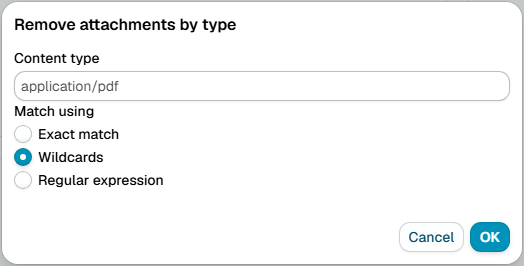
Match using
Choose how to match the content type:
- Exact match - The content type must match exactly
- Wildcards - Use
*to match patterns (e.g.,text/*matches any text format) - Regular expression - Use advanced pattern matching for complex rules
Attachment type
Enter the content type or pattern you want to remove.
Common content types
- application/pdf - PDF documents
- application/msword - Microsoft Word documents (.doc)
- application/vnd.openxmlformats-officedocument.wordprocessingml.document - Microsoft Word (.docx)
- application/vnd.ms-excel - Microsoft Excel (.xls)
- application/vnd.openxmlformats-officedocument.spreadsheetml.sheet - Microsoft Excel (.xlsx)
- application/zip - ZIP archives
- application/x-rar-compressed - RAR archives
- image/jpeg - JPEG images
- image/png - PNG images
- image/gif - GIF images
- audio/mpeg - MP3 audio files
- video/mp4 - MP4 video files
note
Messages in a signed or encrypted container (S/MIME, PGP/MIME) are left untouched, because removing their parts would break the signature or the encryption. A message whose text merely begins with a typed PGP armor line does not count. The trace of a skipped action says that a rule on Message type Signed or Encrypted can block, quarantine or report such messages.
Additional resources
- For information about regular expressions you could check regular-expressions.info or regexone.com