Compress attachments
This action lets you compress attachments in an email message to reduce their total size. It helps optimize storage and makes messages faster to send or forward.
Messages in a signed or encrypted container (S/MIME, PGP/MIME) are left untouched, because rewrapping their parts would break the signature or the encryption. A message whose text merely begins with a typed PGP armor line does not count.
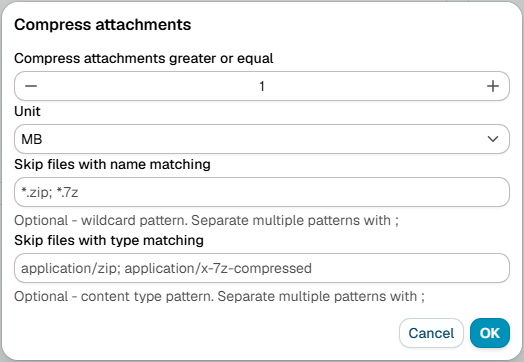
Larger than
Use this option to compress only attachments bigger than a specific size. Enter the size as an integer and select the unit:
- B - Bytes
- kB - Kilobytes (1 kB = 1,024 bytes)
- MB - Megabytes (1 MB = 1,024 kB)
- GB - Gigabytes (1 GB = 1,024 MB)
Skip attachments by name
Skip specific attachments from compression by matching their file names.
Example:
*.zip;*.tar.gz;*.bz2
Skip attachments by type
Example:
application/zip; image/png; video/mp4