Message type
This condition lets you filter messages based on their type. You can choose from:
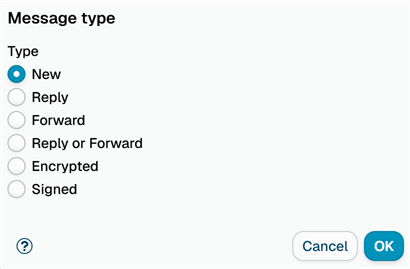
- New - Original messages that aren't replies or forwards
- Reply - Messages that are replies to previous emails
- Forward - Messages that have been forwarded
- Reply or Forward - Messages that are either replies or forwards
- Encrypted - Messages encrypted with S/MIME or OpenPGP
- Signed - Messages the sender signed digitally with S/MIME or OpenPGP
How it works
The application automatically detects the message type by checking:
- Reply messages - Subject line starts with
Re:and contains reply information in theIn-Reply-Tomessage header - Forward messages - Subject line starts with
Fw:orFwd:and contains forward information in theIn-Reply-Tomessage header - New messages - Everything else that isn't a reply or forward
Encrypted and Signed are independent of new, reply and forward - an encrypted reply is both a reply and encrypted. They are detected from the structure of the message:
- Encrypted - S/MIME encrypted messages (
application/pkcs7-mimewith enveloped data), PGP/MIME encrypted messages (multipart/encrypted), and inline PGP messages whose text starts with-----BEGIN PGP MESSAGE----- - Signed - S/MIME and PGP/MIME signed messages (
multipart/signedorapplication/pkcs7-mimewith signed data), and inline PGP signed messages
Mail clients usually sign a message first and encrypt it afterwards, so from the outside such a message is Encrypted only - its signature is not visible until it is decrypted.
The following do not count as signed or encrypted:
- a DKIM or ARC signature - it is added by the sending mail server, not by the sender,
- a
.p7mfile or a signed message attached to an ordinary message, - a message with a malformed
Content-Typeheader.
The processing trace shows what was detected, for example Message is: 'New, Encrypted' or Message is: 'Reply, Signed'.
Signature and disclaimer rules, the Change message format action and the attachment actions of policy rules leave signed and encrypted messages untouched, because changing them would break the signature or the encryption. The attachment actions look at the container only: a message whose text merely begins with a typed PGP armor line still matches Signed or Encrypted here, but its attachments are processed as usual, so use this condition to block, quarantine or report such messages if they are not wanted.
This makes it easy to create rules that handle different types of messages separately. For example, you might want to process new customer inquiries differently than forwarded reports.