Attachment encrypted
This condition matches a message that carries a password protected archive. Sending malware in an encrypted ZIP, 7z or RAR archive, with the password in the message body, is a common way to get it past antivirus scanning, because the scanner cannot look inside. Combine this condition with the Block message action to reject such mail, and add an exception for trusted partners who exchange protected archives with you.
You find the condition under the attachment conditions, as Encrypted. It is available in the conditions and exceptions of policy, signature, disclaimer and autoresponder rules.
How it works
ZIP, 7z and RAR archives are recognised by their content, not by their name, so a renamed archive such as invoice.pdf is found too. Only the archive headers are read. Nothing is decrypted and no password is guessed.
An archive counts as encrypted when:
- any of the files in it is encrypted, or
- it hides even its file names - a 7z archive with encrypted headers, or a RAR archive created with a password for the file names (
rar -hp).
A message matches when at least one of its attachments is an encrypted archive. Attachments that are not archives never match.
Options
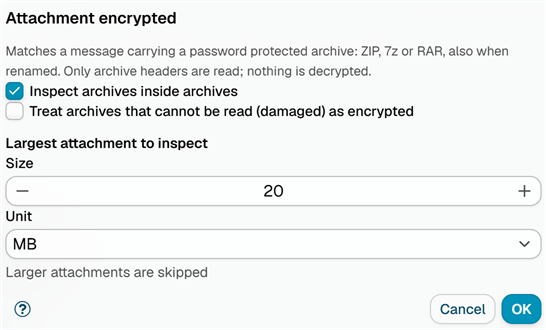
Inspect archives inside archives (on by default): An archive stored inside another archive is checked as well, up to three levels deep, so an encrypted archive wrapped in an ordinary ZIP is found. A nested archive that hides its file names counts as an encrypted file of the archive around it.
Treat archives that cannot be read (damaged) as encrypted (off by default): A damaged archive, or one whose content cannot be read for another reason - more than 10,000 files, or content that unpacks to more than ten times the size limit - counts as encrypted. Tick this to block anything the application cannot look into. When it is off, such archives are ignored.
Largest attachment to inspect: Attachments larger than this size are skipped and do not match. Enter a size of at least 1 and pick the unit, KB, MB or GB. The default is 20 MB.
Click OK to save the condition. In the rule it is listed as Password protected archives (ZIP, 7z, RAR), followed by Nested archives not inspected or Unreadable archives count as encrypted when you changed those options.
Processing trace
The message processing trace shows the result for each archive, for example:
Attachment 'invoice.zip' (ZIP) is password protected: 'invoice.exe' is encrypted.Attachment 'docs.7z' (7z) is not encrypted.Attachment 'secret.7z' (7z) is password protected: 7z archive with encrypted file names.Attachment 'broken.zip' (ZIP) cannot be read: corrupted ZIP archive. Ignored.- orTreated as encrypted.with the damaged option onAttachment 'backup.zip' is larger than 20 MB, not inspected.
Additional resources
- Archive content - match archives by the files they hold
- Attachment name - match the name of the attachment itself
- Attachment type - match attachments by content type