Archive content
This condition looks inside the archive attachments of a message and matches on the files they hold. Use it to catch executables or scripts that are zipped to get past checks on the attachment name. You can also block archives that contain nothing but executables.
A message matches when at least one of its archive attachments matches. Attachments that are not archives are ignored by this condition. Use Attachment name and Attachment type for them.
You find the condition under the attachment conditions, as Archive content. The dialog has three tabs: Files, Condition and Options.
Supported archives
- ZIP
- 7z
- RAR and RAR5
- TAR, TAR.GZ (
.tgz) and GZIP
An attachment is recognised as an archive by its content, not by its name or content type. These are chosen by the sender, and an invoice.pdf can just as well be a ZIP file.
Files
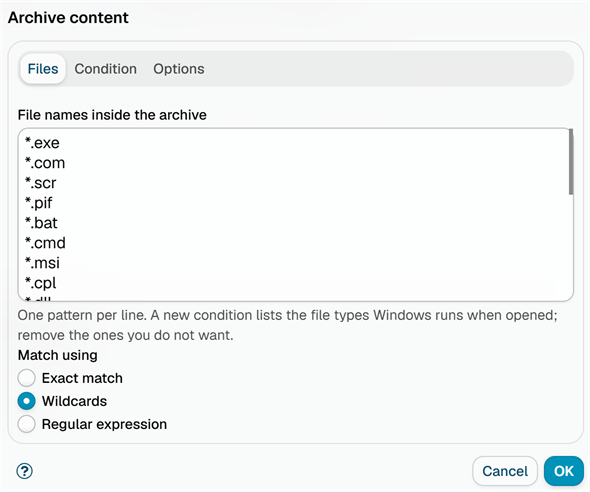
File names inside the archive: One pattern per line. The patterns are matched against the name of each file in the archive, without the folders it is stored in. A new condition is filled with the file types Windows runs, or that open something that does, when they are double-clicked:
*.exe, *.com, *.scr, *.pif, *.bat, *.cmd, *.msi, *.cpl, *.dll, *.js, *.jse, *.vbs, *.vbe, *.wsf, *.wsh, *.hta, *.ps1, *.lnk, *.jar, *.iso, *.img, *.vhd
Remove the ones you do not want, or replace the list with your own patterns.
Match using: How the patterns are matched, as in the Attachment name condition:
- Exact match - the file name must match exactly (case-insensitive)
- Wildcards - use
*to match any text, for example*.exe - Regular expression - for more complex patterns
Condition
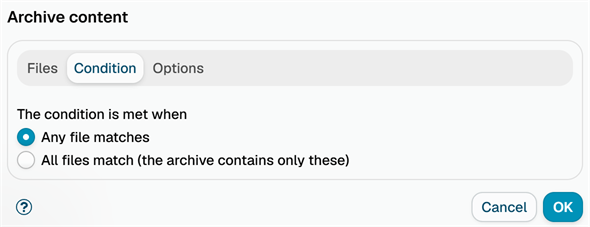
The condition is met when:
- Any file matches (default) - the archive holds at least one file that matches.
- All files match (the archive contains only these) - every file in the archive matches. With the default executable patterns, this catches archives that hold nothing but programs and scripts, and lets archives with ordinary documents through.
An archive that holds no files never matches.
Options
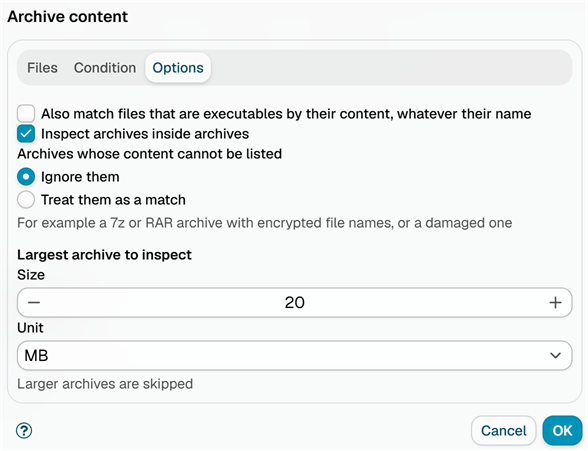
Also match files that are executables by their content, whatever their name: Also match a file whose first bytes identify it as a program, even when its name matches no pattern - for example a Windows program renamed to statement.pdf. It recognises Windows, Linux and macOS executables and scripts that start with #!. The content of encrypted files and of files in RAR archives cannot be read, so for them only the name is checked. When this option is ticked, the pattern list may be empty.
Inspect archives inside archives (on by default): An archive inside the archive is opened and its files are checked as well, up to three levels deep. Its files are shown in the processing trace under the path of the archive they came from.
Archives whose content cannot be listed: What to do with an archive whose files cannot be listed, for example a 7z or RAR archive with encrypted file names, or a damaged archive:
- Ignore them (default) - the archive does not match.
- Treat them as a match - the archive matches. Choose this to block anything the application cannot look into.
A ZIP archive protected with a password usually still lists its file names, so its files are matched by name.
Largest archive to inspect: Archives larger than this size are skipped and do not match. The default is 20 MB. The limit also applies to the unpacked content of GZIP archives and of archives nested inside others, so an archive that unpacks to a huge size (a "zip bomb") cannot exhaust the server. An archive with more than 10,000 files cannot be listed.
Examples
- Block archives that carry programs: Keep the default patterns and Any file matches, and pair the condition with the Block message action.
- Block archives that hold only programs: Keep the default patterns and choose All files match. An archive with an executable next to documents still gets through.
- Catch renamed executables: Tick Also match files that are executables by their content.
- Block archives that cannot be checked: Choose Treat them as a match under Archives whose content cannot be listed.
- Find documents with macros: Replace the list with
*.docm,*.xlsmand*.pptm.
Processing trace
The message processing trace shows each archive that was checked, with its format and number of files, and why it matched or did not. For example:
Archive 'invoice.zip' (ZIP, 2 files): 'invoice.exe' matches '*.exe'Archive 'docs.zip' (ZIP, 3 files): 'readme.txt' matches none of the patterns.Archive 'secret.7z' (7z) cannot be listed: ... Ignored.Attachment 'backup.zip' is larger than 20 MB, archive content not inspected.
Additional resources
- Attachment name - match the name of the attachment itself
- Attachment type - match attachments by content type
- Attachment encrypted - match password protected archives
- For information about regular expressions, see regular-expressions.info or regexone.com