Message recipient
This condition matches the envelope recipients (RCPT TO), as the message has not been sent yet. It is Recipient in the Add menu, offered from the Recipient stage on.
- At Recipient it looks at the one recipient being asked about, and a rule that matches refuses only that recipient.
- At Data and in the Limit rules it looks at all the recipients the mail server accepted, and matches when at least one of them matches.
The dialog has two tabs: Match by and Aliases. An envelope recipient has no To, Cc or Bcc, so there is no Search in tab, and no Match when tab as in the other rule types.
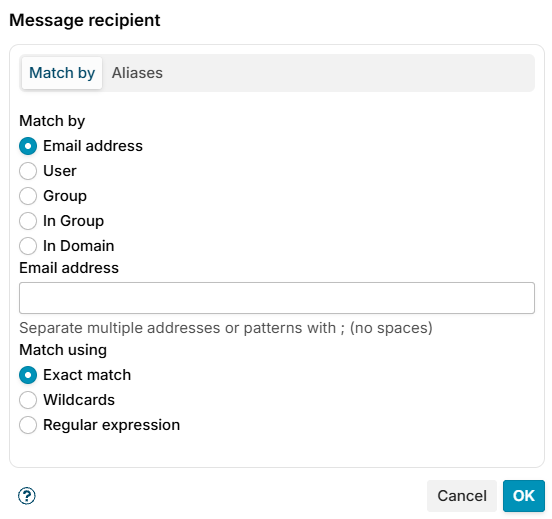
Match by
Email address
Enter the recipient's email address, or several separated with ; and no spaces, and choose how to match it:
- Exact match - the email address must match exactly (e.g.,
john@mshsoftware.com) - Wildcards - use
*to match patterns (e.g.,*@mshsoftware.commatches anyone from that domain) - Regular expression - use advanced pattern matching for complex rules
User
Select a specific user from the list. The condition matches if that user is a recipient.
Group
Choose a distribution list. The condition matches if the message is addressed to the list itself, that is to the list's own address rather than to one of its members. The client names the list address in RCPT TO and the list is expanded later, so at this point the recipient is still the list address.
In Group
Choose a group from the list. The condition matches if a recipient is a member of that group, so a message addressed to the group's own address does not match it - use Group above for that.
In Domain
Select a domain. The condition matches if the recipient's email address belongs to that domain.
Aliases
A Zimbra account can have alias addresses next to its primary address, for example john@mshsoftware.com with the alias john.smith@mshsoftware.com. The directory sync imports them, and they are listed in the aliases row on the user's page under Domains.
The Match the alias addresses as well checkbox, ticked by default, makes a User, Group or In Group match accept those aliases too: a message addressed to john.smith@mshsoftware.com then matches a condition written for the user john@mshsoftware.com, and a message to an alias of a group member counts as a message to that member.
Untick it to match the primary address only. The condition then shows no aliases in the rule's condition list.
The checkbox has no effect on Email address and In Domain matching, which compare the address exactly as the client gave it.
Additional resources
- Recipient in address list - match recipients on a shared list of addresses and domains
- Domains - read more about domains, users and groups
- For information about regular expressions you could check regular-expressions.info or regexone.com