Limit rules
Limit Rules, under Rules after SMTP Rules, limit how much mail passes. Use them to contain a compromised account or a runaway script before it sends thousands of messages and gets your server on a blocklist. They do what the quotas module of cbpolicyd does on Zimbra.
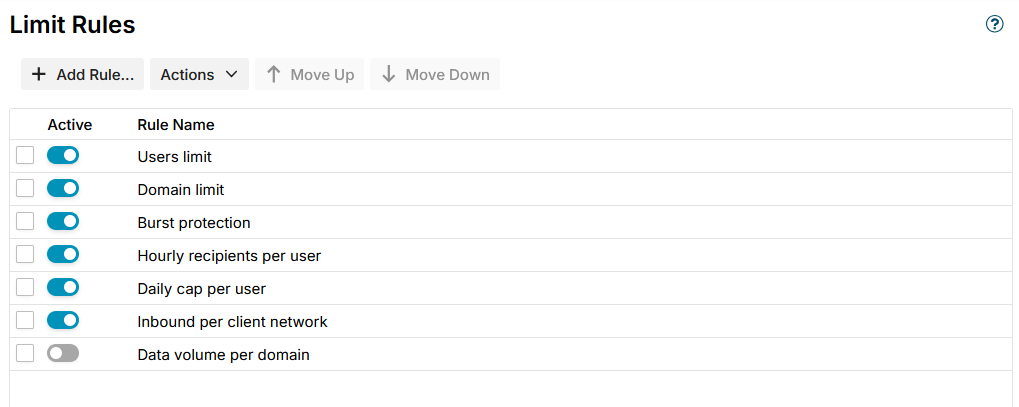
A limit allows at most a number of messages, or a total size, per period. Over the limit the message is rejected or deferred. The conditions and exceptions of the rule choose which messages count: for example only mail of users who logged in, or everything but the address list Exempt senders.
Message Limits
The Message Limits page, under Logs in the navigation, shows the counters of the limit rules, summed over all servers, the fullest first. For each counter it shows the rule, who is counted, the limit, how much of it is used, and, for a full counter, when mail passes again.
Reset in a row lifts that counter on every server, so the sender can send again at once. Use it, for example, once you have checked that a user who hit the limit is not a compromised account.
Notices
When a counter is full, for example a sender over its limit, the web admin sends the addresses in Notify one e-mail: which rule, the limit, who is counted, the client address, the recipients and the reply the sender got. It is sent once per period of the limit for each counter, however many messages are refused and on however many servers, and again only when the counter is full in a later period.
- The notice is sent through the SMTP host of Server config, from the first address in Notify. It passes the SMTP rules and limit rules like any other mail, so a limit that counts every sender counts it too.
- The web admin collects the refusals from the servers every 30 seconds. Refusals while the web admin is not running are not told afterwards.
Locking a taken-over account
MSH Zimbra Rules does not lock accounts by itself. When a notice shows an account that was taken over, for example a user suddenly sending to hundreds of outside addresses, lock it on the Zimbra server:
sudo su - zimbra -c 'zmprov ma olivia@example.com zimbraAccountStatus locked'
A locked account cannot log in, so it cannot send either; mail to it is still delivered. Change its password, then unlock it:
sudo su - zimbra -c 'zmprov ma olivia@example.com zimbraAccountStatus active'
The notice names the account and these two commands.
Additional resources
- Message limits - the counters and how to reset one
- SMTP events - the messages a limit refused
- SMTP rules - the stages and how SMTP rules run
- cbpolicyd quotas - how the same is done with cbpolicyd