Action
An SMTP rule has one action, edited right on its Action tab. There is no Add menu as in policy rules. The action says how a matching client, message or recipient is refused.
The action of a limit rule is the limit itself.
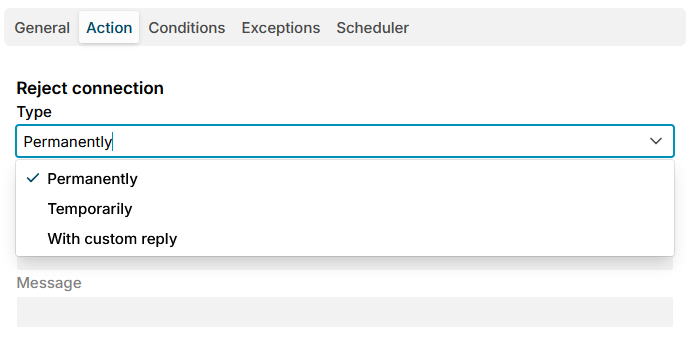
Reject
The heading of the tab says what is refused, which depends on the stage:
| Stage | Heading | What is refused |
|---|---|---|
| Connect, HELO | Reject connection | Every message on the connection. Postfix tells the client at its MAIL FROM. |
| Sender, Data | Reject message | The whole message, for every recipient |
| Recipient | Reject recipient | That one recipient; the others still get the message |
Type says how:
| Type | The client gets | The client |
|---|---|---|
| Permanently (default) | A permanent error from Postfix, such as 550 5.7.1 Command rejected | Does not try again. A mail server bounces the message to its sender; a mail client shows the error. |
| Temporarily | A temporary error from Postfix, such as 451 4.7.1 Service unavailable - try again later | Keeps the message and tries again later |
| With custom reply | The Response code, Status and Message you enter | Retries for a 4xx code, gives up for a 5xx code |
The Response code, Status and Message fields are enabled only for With custom reply. Response code is required, the other two are optional. For example:
| Response code | Status | Message | Use |
|---|---|---|---|
550 | 5.7.1 | Mail from your network is not accepted | A network you never want mail from |
554 | 5.7.1 | Relay access denied | A recipient you do not accept mail for |
450 | 4.7.1 | Try again later | A client you want to slow down |
Unlike the Block message action of policy rules, an SMTP rule cannot discard: the client always learns that it was refused.
A temporary refusal is the safer choice while you try a new rule: a sender wrongly refused keeps the message and delivers it once you change the rule. Watch the SMTP Events page, then switch to Permanently.
Additional resources
- Limit rules - the action of a limit rule
- SMTP events - every refusal, with the rule and the answer the client got
- Sources for SMTP codes