Automatic replies
The Settings > Automatic Replies page sets what holds for the Automatic Replies of every user: how often a sender gets a reply, how many rules a user can have, who gets replies, how the replies look and which headers they carry. The rules themselves are the users' own, made in the Automatic Replies zimlet; you see them on Rules > Automatic Replies.
Open Automatic Replies in the Settings section of the navigation. The page is available to administrators only.
The page has four tabs: General, Recipients, Format and Headers. Save Settings under them saves all tabs at once. A tab with a field that is not valid is marked in red when you save, and the first such tab is shown. The servers pick the settings up with the other settings, usually within a minute.
General
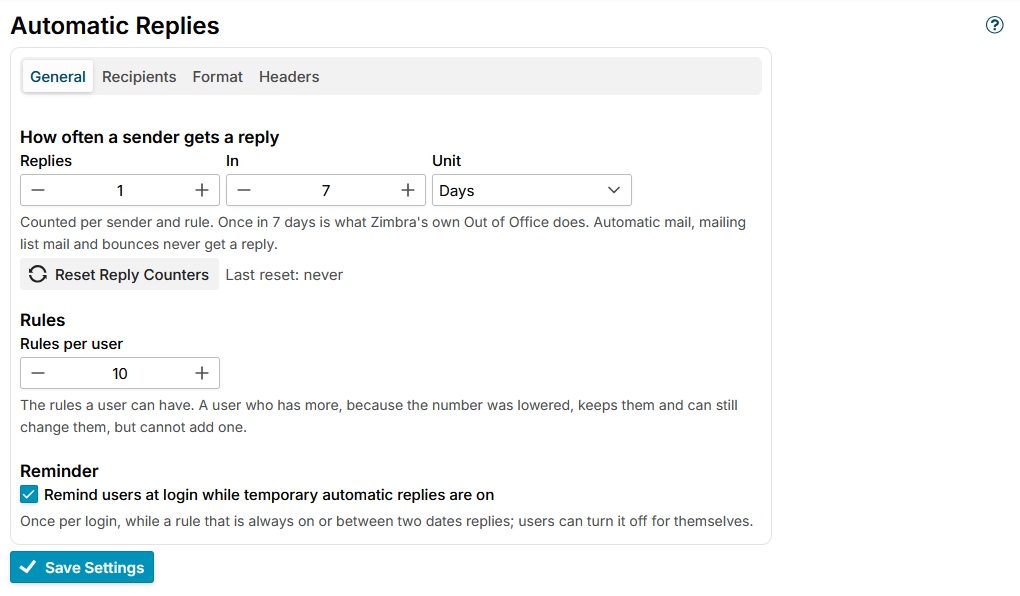
| Field | Default | Meaning |
|---|---|---|
| Replies / In / Unit | 1 in 7 Days | How often a sender gets the reply of a rule, counted per sender and rule. Replies is 1 to 100, In 1 to 1000, Unit Minutes, Hours, Days or Weeks. Once in 7 days is what Zimbra's own Out of Office does. |
| Rules per user | 10 | How many rules a user can have, 1 to 50 |
| Remind users at login while temporary automatic replies are on | On | Users are reminded once per login while a rule that is always on, or between two dates, replies |
Automatic mail, mailing list mail and bounces never get a reply, whatever these settings say.
Rules per user
The zimlets show users how many rules they have of how many they can make, and disable Add at the limit. A user who has more rules than the limit, because you lowered it, keeps them and can still change them, but cannot add one.
Reset Reply Counters
Reset Reply Counters lets every sender get the reply of each rule again, as if none had been sent, for the rules of all users.
The reset asks for a confirmation and takes effect at once, without Save Settings. The servers take it with the next settings update. Next to the button the page shows when the counters were reset last, for example Last reset: 2026-11-24 09:30, or Last reset: never.
Reminder
While the reminder is on, a user whose automatic replies are on is reminded once per login while a rule that is always on, or a rule between two dates that covers today, replies. Weekly rules and rules for outside the working hours do not count. Users can turn the reminder off for themselves in the zimlet, see Reminder at login.
Untick it to turn the reminder off for everyone. The zimlets then also hide the users' own checkbox.
Recipients
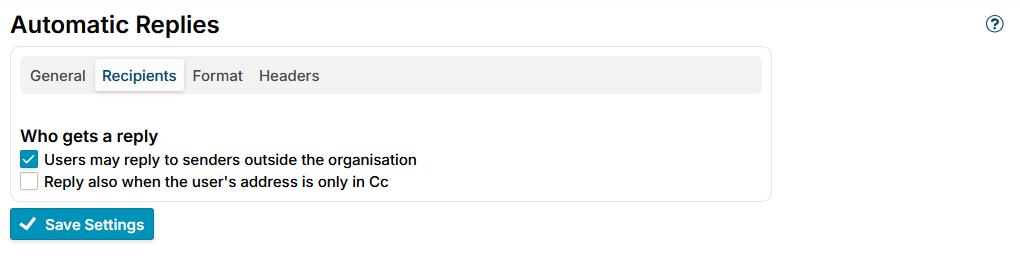
Who gets a reply:
| Field | Default | Meaning |
|---|---|---|
| Users may reply to senders outside the organisation | On | When unticked, only colleagues, senders from the domains of the organization, get replies. The zimlets leave Reply to people outside out of the rule window and say that the organization replies only to colleagues. The rules keep their replies to people outside for when you tick it again. |
| Reply also when the user's address is only in Cc | Off | By default only addresses in To get a reply. When ticked, an address only in Cc gets one too. An address only in Bcc never does. |
Format
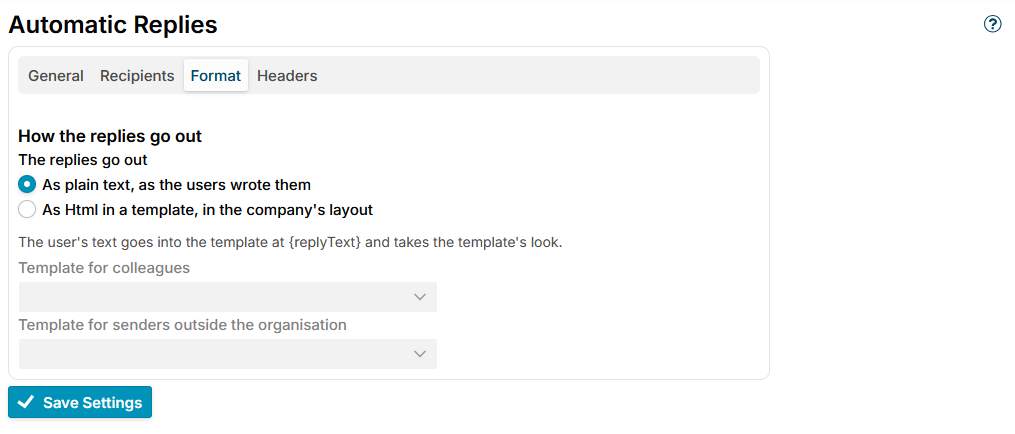
The replies go out:
- As plain text, as the users wrote them (default) - the reply is plain text.
- As Html in a template, in the company's layout - the user's text goes into a template where the template has
{replyText}, and takes the template's look.
With Html, choose two templates:
- Template for colleagues - for replies to senders from the domains of the organization
- Template for senders outside the organisation - for everyone else. It is used once users may reply to senders outside the organization, see Recipients.
Both can be the same template. Each must have {replyText} in its Html, where the reply goes; you find it in the template's variables under Automatic Replies as Reply Text. Without it the settings are not saved and the field says The template has no {replyText} in its Html, where the reply goes.
The reply carries the template's text body too, with the user's text at {replyText}. When the text body has no {replyText}, the settings are saved with a warning, and the user's text is added at the end of the text body. The images of the template go with the reply as the template's images setting says.
The user's text keeps its line breaks and links, without a look of its own. When a template cannot be found at the time of sending, the reply goes out as plain text, so it is never lost for its layout, and the processing trace says so.
With plain text, the template fields are disabled and keep what was chosen, so switching back to Html finds them. A template chosen here cannot be removed on the Templates page, also while the replies go out as plain text; the page says it is used by Settings > Automatic Replies.
Headers
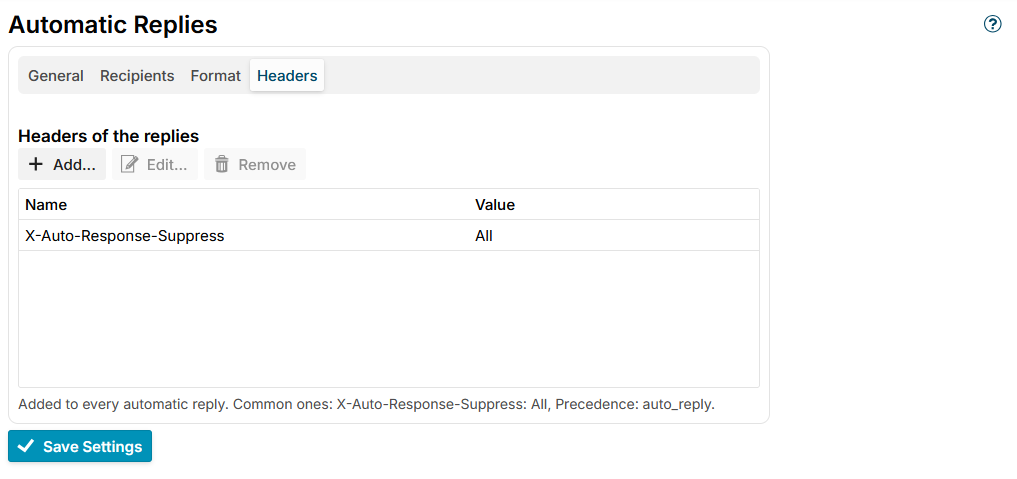
Headers of the replies lists headers that every automatic reply of a user carries, after the headers the product sets itself, such as Auto-Submitted: auto-replied. Common ones are X-Auto-Response-Suppress: All and Precedence: auto_reply.
Add... opens a dialog with the Header name and the Header value, Edit... and Remove change or delete the selected header. The list is sorted by name, the order the replies carry them in, and holds at most 20 headers.
| Field | Check |
|---|---|
| Header name | Required, at most 76 characters, letters, digits and signs only, no space and no colon. A name can be in the list only once, whatever its case. |
| Header value | No line breaks and no control characters. The name, : and the value together are at most 998 characters. |
A header the product sets itself cannot be added: From, Sender, Reply-To, To, Cc, Bcc, Subject, Date, Message-ID, MIME-Version, In-Reply-To, References, Auto-Submitted, Received, Return-Path, DKIM-Signature, and any header starting with Content-, X-MSH-, ARC- or Resent-.
The list starts with X-Auto-Response-Suppress: All, so Exchange and Outlook send no automatic reply to an automatic reply. An installation updated from 1.4.0 has it too, so its automatic replies carry this header after the update. Remove it from the list if you do not want it.
Backup & Restore
Backup & Restore exports and imports these settings with the automatic replies of all users, as the Automatic replies section.
Additional resources
- Automatic Replies - how the replies are sent, and the mailboxes with automatic replies
- Automatic Replies zimlet - what users see
- Templates - the templates for replies in Html