Dashboard
The Dashboard is the start page of the administrator panel.
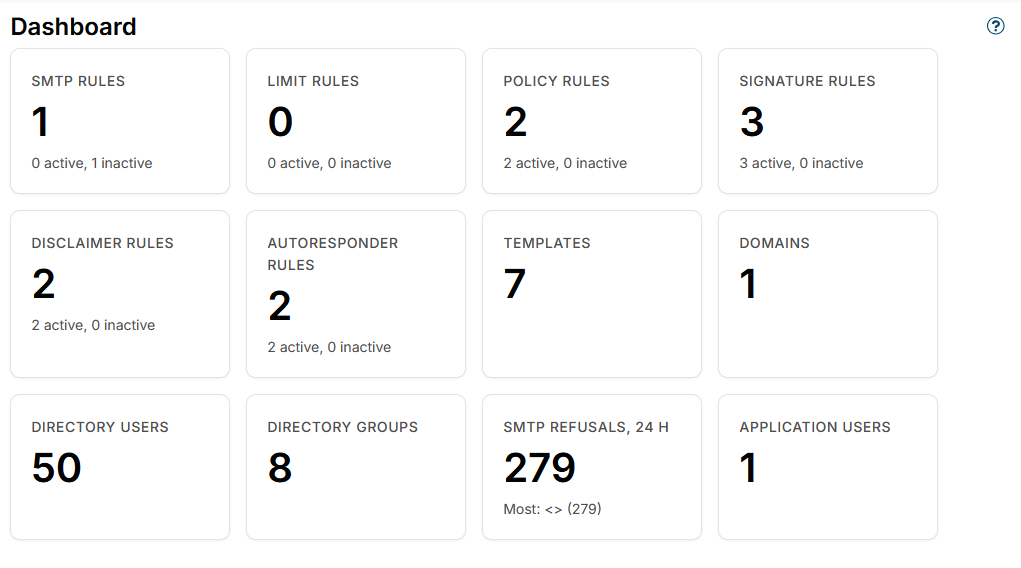
It shows summary cards with the current state of the configuration:
- SMTP rules, Limit rules, Policy rules, Signature rules, Disclaimer rules, Autoresponder rules - the number of configured rules of each type, with a breakdown of how many are active and inactive.
- Templates - the number of templates created on the Templates page.
- Domains - the number of mail domains synced from the directory service.
- Directory users and Directory groups - the number of users and groups imported from the Directory service.
- Application users - the number of administrator panel accounts (shown to administrators only, see Access control).
- SMTP refusals, 24 h - how many connections, messages and recipients the SMTP rules refused on all servers in the last 24 hours, with the three senders refused most, for example Most: spam@example.net (41), .... It says No refusals when there were none, and Not every server answered when a server could not be asked. Click it to open SMTP Events. The card is shown once at least one server is configured.
Click a card to open the corresponding page.
While rule processing is suspended, a notice above the cards says what is suspended, with a link to the Rules processing page.
Additional resources
- Directory service - sync users, groups and domains from Zimbra LDAP
- Domains - browse the synced domains, users and groups