Flag Spoofed Senders in Zimbra with a Sieve Filter
Invoice fraud rarely uses a clever forgery. It uses a display name. The message arrives
as Anna Nowak <a.nowak.finance@gmail.com>, and because most mail clients show only the
name, it reads as if it came from the colleague who signs off payments. A Sieve script can
compare what the sender claims with where the message actually came from, and mark the
mismatch.
Part of the series on Everyday Uses for Sieve Mail Filters in Zimbra. It builds on Tag External Mail in Zimbra, which marks all external mail; this one marks the subset that is pretending to be internal.
The rule that needs no maintenance
The strongest version of this filter needs no list of names at all. It looks for messages
whose From: header mentions one of your own domains anywhere - in the display name, the
address, or both - while the message was actually delivered from somewhere else.
require ["envelope", "editheader", "variables"];

if allof (header :contains "from" ["@example.com", "@example.net"],
          not envelope :domain :is "from" ["example.com", "example.net"]) {

    addheader "X-Sender-Spoofed" "yes";

    if allof (header :matches "subject" "*",
              not header :contains "subject" "[SUSPICIOUS]") {
        replaceheader :newvalue "[SUSPICIOUS] ${1}" "Subject";
    }
}
Nobody outside your organization has a legitimate reason to put your domain in the From:
header of a message they send from their own server. That makes this rule unusually quiet
for how much it catches.
How it works
The two tests look similar and are deliberately different.
header :contains "from" reads the raw From: header, display name and all. That is
the point - address would parse the header and hand back only the address part, throwing
away the display name, which is exactly where the forgery lives.
envelope :domain :is "from" reads the SMTP envelope sender, which is set by the server
that actually delivered the message and is not something the author writes. When the two
disagree, something is wrong.
Because the rule compares a claim against a fact, it does not need to know who works for
you. It catches "Anna Nowak" <anna@evil.example> only if the attacker also writes your
domain into the header, so pair it with the name-based rule below for full coverage.
Adding a list of names
The rule above misses a message from Anna Nowak <a.nowak.finance@gmail.com>, because
nothing in it mentions your domain. Catching that needs the names of the people worth
impersonating - usually management, finance and HR, which is a short list:
require ["envelope", "editheader", "variables"];

if allof (header :matches "from" ["*Anna Nowak*",
                                  "*Jan Kowalski*",
                                  "*Piotr Zielinski*"],
          not envelope :domain :is "from" ["example.com", "example.net"]) {

    addheader "X-Sender-Spoofed" "name";

    if allof (header :matches "subject" "*",
              not header :contains "subject" "[SUSPICIOUS]") {
        replaceheader :newvalue "[SUSPICIOUS] ${1}" "Subject";
    }
}
The * on both sides of each name matters. :matches compares against the whole header
value, so "Anna Nowak" alone would only match a header that is exactly that, and the
real header is something like Anna Nowak <anna@example.com>.
Watch out for encoded display names. A name containing anything outside ASCII arrives
MIME-encoded, as =?UTF-8?Q?Anna_Nowakowska?= rather than as readable text. Whether your
Zimbra version decodes that before the header test sees it is worth confirming with a
real message rather than assuming. The safe workaround is to match on an ASCII-only
fragment of each name - "*Kowalski*" rather than a name with diacritics.
Applying it
Both scripts use addheader and replaceheader, so they are admin scripts and need
header editing switched on:
sudo su - zimbra -c 'zmprov mc default zimbraSieveEditHeaderEnabled TRUE'
sudo su - zimbra -c 'zmprov md example.com zimbraAdminSieveScriptBefore "$(cat /tmp/spoof.sieve)"'
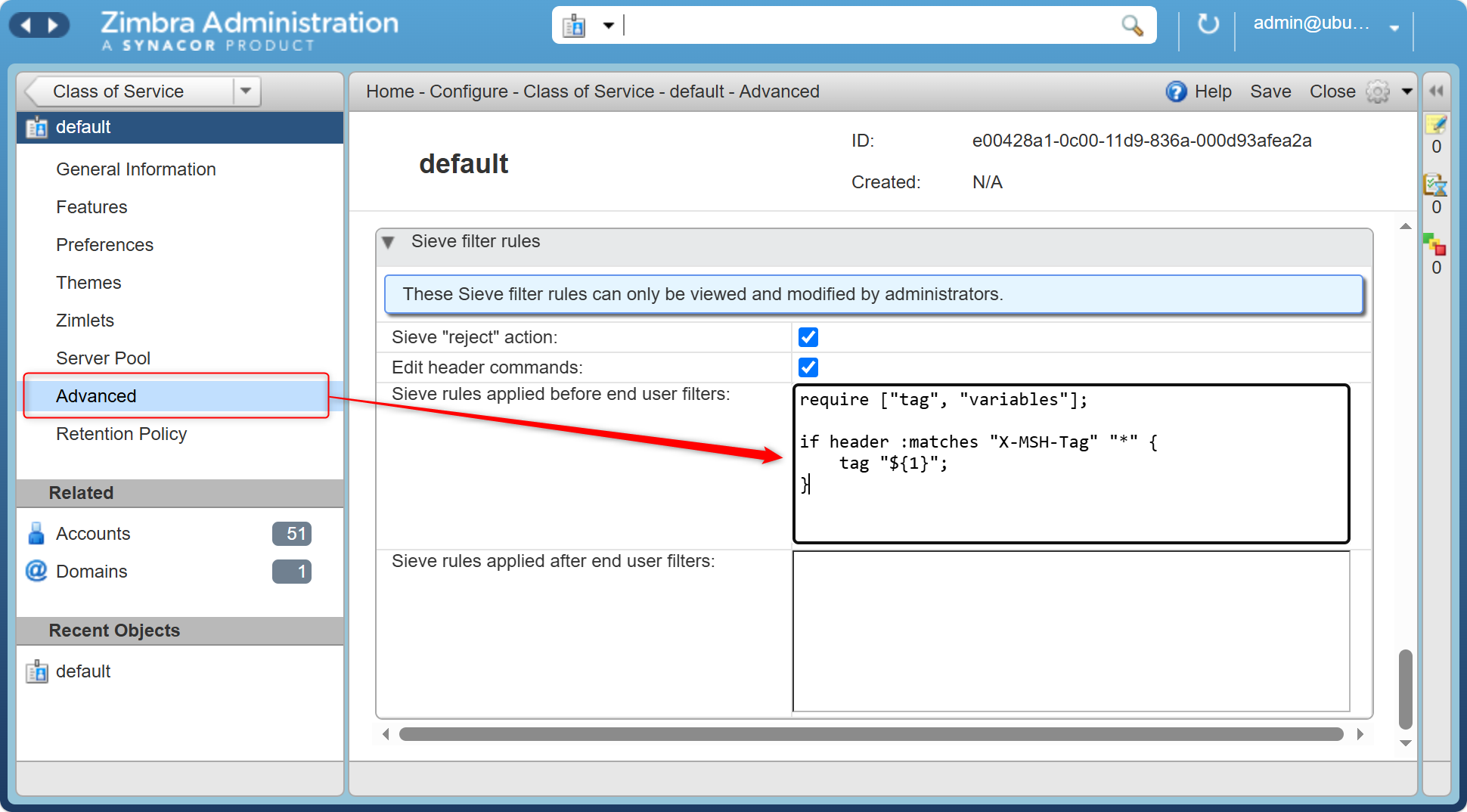
In the admin console from Zimbra 9, the same thing lives under the domain's Advanced page, in Sieve filter rules: tick Edit header commands and paste the script into Sieve rules applied before end user filters.
If the script saves but nothing happens to your test message, the cause is almost always
that zimbraSieveEditHeaderEnabled is still FALSE - the header commands fail silently
rather than reporting an error.
Troubleshooting Zimbra Sieve Filters covers how to tell
that apart from a condition that never matched.
A caught message keeps the display name the sender chose, which is the whole point: the
name still reads like a colleague, and the subject in front of it now begins
[SUSPICIOUS].
Marking without editing headers
If you would rather not enable header editing, flag and tag work in any script and need
no configuration at all:
require ["envelope", "flag", "tag"];

if allof (header :contains "from" ["@example.com", "@example.net"],
          not envelope :domain :is "from" ["example.com", "example.net"]) {
    tag "Suspicious sender";
    flag "priority";
}
This is less visible than a subject marker but takes effect immediately, which makes it a reasonable way to measure how often the rule would fire before you commit to marking subjects.
What it does not catch
- A compromised internal account. Mail from a real account with a stolen password has a
correct envelope and a correct
From:. Nothing here will flag it. - Lookalike domains.
exampIe.comwith a capital I is not your domain, so neither rule fires. Catching those needs a list of the lookalikes, which is a different filter and an endless one. - Anything before delivery. Sieve runs when the message is stored, so this marks the
recipient's copy only. Proper sender authentication - SPF, DKIM and a DMARC policy of
rejecton your own domain - is what stops the message being accepted in the first place, and it belongs upstream of Sieve rather than in it.
Treat this filter as the last line rather than the first. It is cheap, it needs no new software, and it catches the messages that got through everything else.
Next in this series
Back to Everyday Uses for Sieve Mail Filters in Zimbra, or on to File Suspected Spam by Its Score.