Keep Automated Alerts and Reports Out of the Inbox in Zimbra
An administrator's mailbox fills up with machines talking: backup summaries, cron output, monitoring checks, certificate renewals, nightly reports. Almost all of it says everything is fine. The danger is not the volume, it is what the volume does to attention - after a month of identical green reports, the one that says a backup failed looks exactly like the others.
The useful filter is not "file the alerts". It is "file the boring ones and leave the failures where I will see them".
Part of the series on Everyday Uses for Sieve Mail Filters in Zimbra.
The filter
require ["fileinto", "flag"];

# Failures stay in the Inbox, flagged, whoever sent them.
if allof (address :localpart :is "from" ["cron", "root", "noreply", "monitoring", "backup"],
          header :matches "subject" ["*FAIL*", "*ERROR*", "*CRITICAL*",
                                     "*not ok*", "*DOWN*"]) {
    flag "flagged";
    keep;
    stop;
}

# Everything else from a machine goes to a folder.
if address :localpart :is "from" ["cron", "root", "noreply", "monitoring", "backup"] {
    fileinto "Automated";
    stop;
}
The order is the whole design. The failure rule runs first and claims the message with
keep and stop, so the filing rule below never sees it.
keep is doing real work here. flag says how to mark a message but not where to put it,
so without keep the message would fall through to the next rule and be filed after all.
address :localpart matches the part of the sender address before the @, which is how
one rule covers cron@web01, cron@db02 and every other machine on the estate without
listing hostnames.
Matching the sender more precisely
The localpart list is broad by design. If a real person in your organization is called
root - it happens - or you want to be stricter, match the whole address or the domain
instead:
require ["fileinto"];

if anyof (address :domain :is "from" ["monitoring.example.com", "ci.example.com"],
          address :is "from" ["backup@example.com", "alerts@nagios.example.com"]) {
    fileinto "Automated";
    stop;
}
Another reliable signal is the header that well-behaved automated senders set:
require ["fileinto"];

if anyof (exists "Auto-Submitted",
          header :contains "Precedence" ["bulk", "junk"],
          header :contains "X-Cron-Env" "") {
    fileinto "Automated";
    stop;
}
exists "Auto-Submitted" catches anything following RFC 3834, and X-Cron-Env is set by
most cron implementations, which makes it a precise way to catch cron output specifically.
A folder per system
Once more than a few systems report in, one folder is no better than the Inbox:
require ["fileinto", "variables"];

if address :matches :domain "from" "*" {
    set :lower "sender" "${1}";
}

if address :localpart :is "from" ["cron", "root", "monitoring", "backup"] {
    fileinto "Automated/${sender}";
    stop;
}
Each sending host gets its own subfolder. As always, Zimbra will not create a folder that does not exist, and a message with nowhere to go lands in the Inbox - which for this filter is a reasonable failure, since an unfamiliar system reporting in is worth noticing.
Escalating out of hours
A failure at 3 a.m. deserves more than a flag. Zimbra's current_time test reads the
delivery time in the account's own time zone:
require ["fileinto", "notify"];

if allof (address :localpart :is "from" ["monitoring", "backup"],
          header :matches "subject" ["*FAIL*", "*CRITICAL*"],
          anyof (current_time :before "0800",
                 current_time :after "1800",
                 current_day_of_week :is ["0", "6"])) {
    notify "oncall-sms@example.com" "Out of hours alert" "A monitoring alert arrived outside working hours.";
    keep;
    stop;
}
current_day_of_week counts 0 for Sunday through 6 for Saturday, so ["0", "6"] is
the weekend.
notify has two different grammars in Zimbra, chosen by the account attribute
zimbraSieveNotifyActionRFCCompliant. The positional form above applies while it is
FALSE, which is the default. If it has been set to TRUE on your server, use the RFC
5435 form instead:
require ["enotify"];

notify :importance "1"
       :message "Out of hours alert"
       "mailto:oncall-sms@example.com";
Mixing the two is a common reason a notify rule saves cleanly and then never fires. See Sieve Actions in Zimbra for the details of both forms.
Deleting the truly worthless
Some automated mail has no value even in a folder. A daily report nobody has opened in a
year is a candidate for discard:
if allof (address :is "from" "reports@example.com",
          header :contains "subject" "Daily summary",
          not header :matches "subject" ["*FAIL*", "*ERROR*"]) {
    discard;
    stop;
}
Keep the failure exception even here. The reason a report is worthless is that it always says the same thing, and the day it does not is the day you need it.
Applying it
Nothing here needs editheader, so the filter works as a personal filter or as an admin
script.
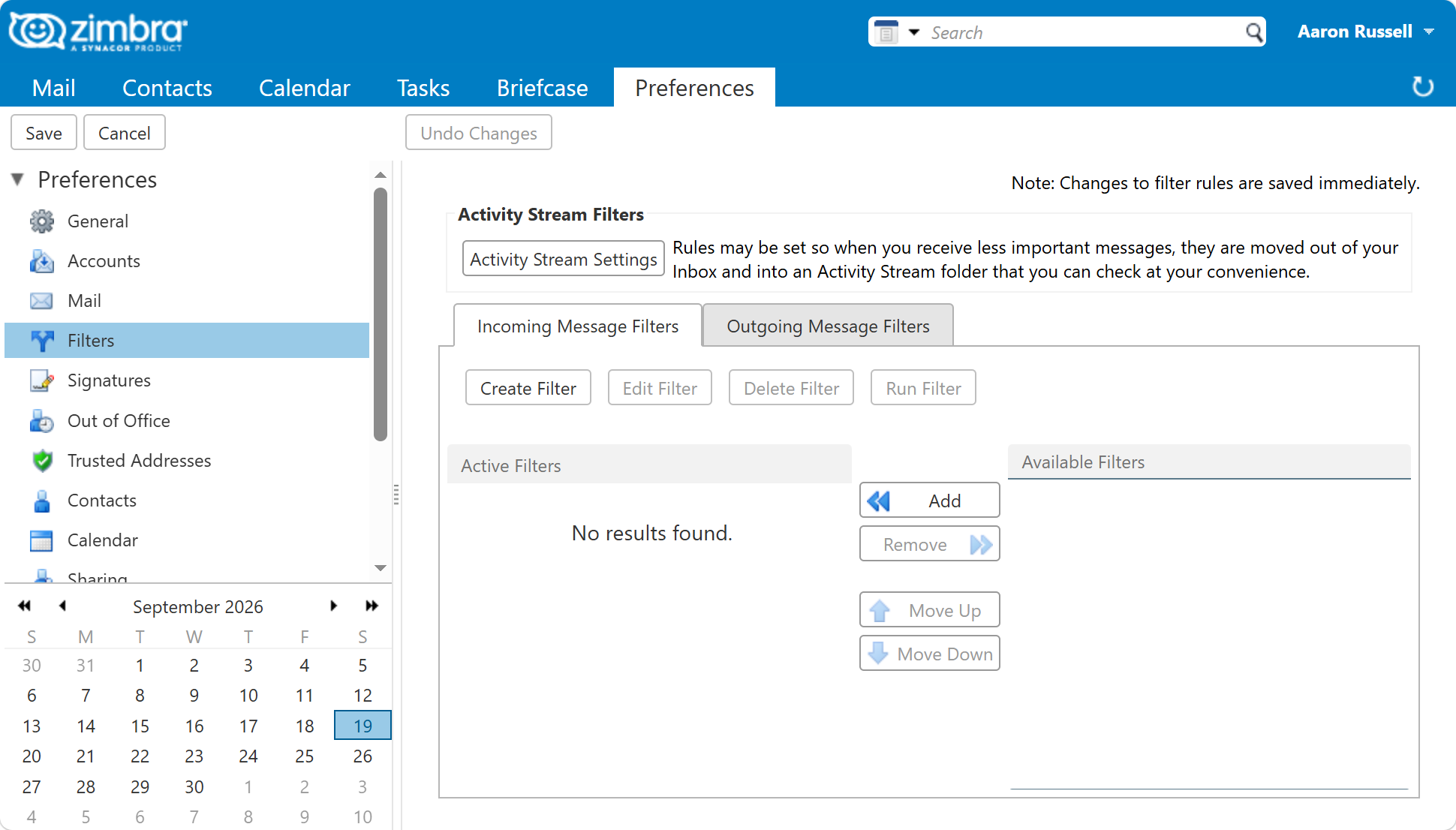
In the web client, under Preferences > Filters, with a condition on the from address and an action of filing into a folder.
From the command line, for one user:
sudo su - zimbra -c 'zmprov ma user@example.com zimbraMailSieveScript "$(cat /tmp/alerts.sieve)"'
For everyone who receives system mail, as an admin script on the domain:
sudo su - zimbra -c 'zmprov md example.com zimbraAdminSieveScriptBefore "$(cat /tmp/alerts.sieve)"'
Use the Run Filter button in the web client to apply the rule to the Inbox once it is saved. On an administrator's mailbox this usually moves several thousand messages and makes the point better than any description.
Test the failure path, not the happy path
The filing rule will obviously work. The rule worth testing is the other one, because a filter that quietly swallows failures is worse than no filter at all.
Send yourself a message from one of the matched senders with FAILED in the subject and
confirm it stays in the Inbox and arrives flagged. Then check the wording your own systems
actually use - a tool that reports not ok or WARN rather than FAILED will slip
straight past the list above.
Next in this series
That is the last of the ten. Back to Everyday Uses for Sieve Mail Filters in Zimbra for the full list, or read Sieve Conditions in Zimbra for every test you can build a rule from.