Tag External Mail in Zimbra with a Sieve Filter
In most mail clients a message from a stranger looks exactly like one from the colleague at the next desk: same layout, same display name, same everything. That similarity is what invoice fraud and payroll-diversion attacks rely on. One admin Sieve script, applied once to a domain, gives every user a visible reason to slow down before they trust a request.
This is the first article in the series on Everyday Uses for Sieve Mail Filters in Zimbra.
What the filter does
For every message whose sender is outside your own domains, it does two things:
- adds an
X-External-Sender: yesheader, which later filters and mail clients can match on without the user seeing anything, and - prepends
[EXTERNAL]to the subject, which the user cannot miss.
The two serve different purposes. The header is for automation - your own later rules, a client-side display rule, a report. The subject marker is for the person reading the message.
The filter
require ["envelope", "editheader", "variables"];

# Anything that did not come from one of our own domains is external.
if not envelope :domain :is "from" ["example.com", "example.net"] {

    # A marker for later rules and for mail clients.
    addheader "X-External-Sender" "yes";

    # And a marker for the person reading the message, added only once.
    if allof (header :matches "subject" "*",
              not header :contains "subject" "[EXTERNAL]") {
        replaceheader :newvalue "[EXTERNAL] ${1}" "Subject";
    }
}
Replace example.com and example.net with every domain and alias domain your
organization actually sends from. A domain you forget is a domain whose mail gets marked
external, and users will report it as a bug.
How it works
envelope :domain :is "from" reads the SMTP envelope sender - the address Postfix was
given during the delivery - rather than the From: header. This matters more than it
looks. The From: header is written by the sender and can say anything, so a phisher
forging ceo@example.com would slip past a test that trusted it. The envelope is set by
the server that actually delivered the message, so the forgery still gets marked.
The inner allof has two guards. header :matches "subject" "*" captures the existing
subject into the variable ${1}, which is why variables appears in the require line.
not header :contains "subject" "[EXTERNAL]" stops the marker being added twice when a
message passes through the filter more than once, for example on a forward.
addheader and replaceheader both come from the editheader extension, which Zimbra
ships disabled and documents as a feature of admin scripts. Enabling it is the first
step below, and skipping it is the single most common reason this filter appears to do
nothing.
For more on the keywords used here, see Sieve Actions in Zimbra and Sieve Conditions in Zimbra.
Applying it from the command line
All commands run on the Zimbra server as the zimbra user.
sudo su - zimbra
First enable header editing. It is off by default, and without it the script is valid but the two header commands do nothing. This sets it for the default class of service:
zmprov mc default zimbraSieveEditHeaderEnabled TRUE
Save the script from above to a file, say /tmp/external.sieve, then set it as the
domain's admin "before" script:
zmprov md example.com zimbraAdminSieveScriptBefore "$(cat /tmp/external.sieve)"
Check what was stored, and remove it again if you need to:
# show it
zmprov gd example.com zimbraAdminSieveScriptBefore

# remove it
zmprov md example.com zimbraAdminSieveScriptBefore ""
Use zmprov mc for a class of service or zmprov ma for a single account in exactly the
same way. No restart is needed - the next message delivered picks up the new script.
One warning worth repeating: zmprov stores the script without checking it. A typo is
accepted silently and only shows up later, as a filter error in
/opt/zimbra/log/mailbox.log when mail arrives. Check the syntax before you save, for
example on checksieve.com, which runs in the browser - though it
does not know Zimbra's own keywords such as tag or replaceheader.
Applying it in the admin console
From Zimbra 9 the same thing can be done without the command line. Open the domain, go to Advanced and scroll to Sieve filter rules. Tick Edit header commands, then paste the script into Sieve rules applied before end user filters.
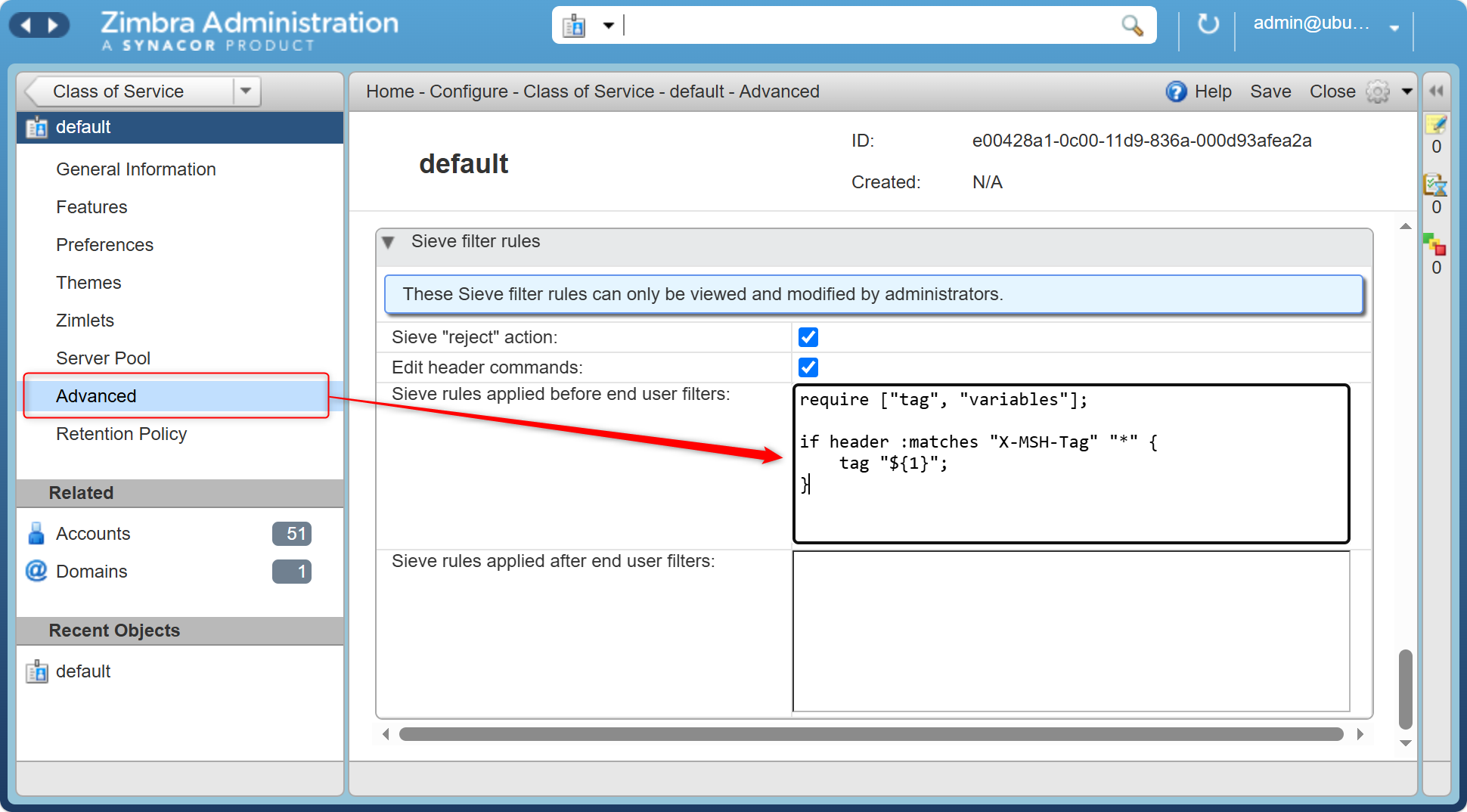
The screenshot shows a class of service, but a domain has the identical section. Unlike
zmprov, the console validates the script when you save it.
Checking it works
Send a message to a mailbox on the domain from an address outside it - a personal webmail
account is enough - and open it in the web client. The subject should carry the marker, and
Show Original should list the X-External-Sender header.
In the message list the subject reads [EXTERNAL] Invoice 2026-114 instead of
Invoice 2026-114, and X-External-Sender: yes appears in the Show Original output
among the other headers Zimbra added at delivery.
Then send one from an internal account and confirm it arrives untouched. That second test is the one people skip, and it is the one that catches a mistyped domain in the list.
When nothing happens
The three editheader commands are unusual in how they fail. They do not raise an error,
write to the log or stop the script - they simply return and let delivery continue, so a
filter that is silently doing nothing looks exactly like one whose condition never matched.
Two settings cause it, and both are worth checking in order.
The setting is off. zimbraSieveEditHeaderEnabled defaults to FALSE, and
addheader, deleteheader and replaceheader all check it before doing anything:
zmprov gc default zimbraSieveEditHeaderEnabled
If that prints FALSE, this is the problem. Set it to TRUE as shown above. Use
zmprov ga or zmprov gd if you applied the script to one account or a domain rather than
a class of service, because the setting is inherited from account to COS to domain.
The header is protected. Zimbra keeps a list of headers no script may touch, and a command naming one of them returns just as quietly:
zmprov gc default zimbraSieveImmutableHeaders
The default list is Received, DKIM-Signature, Authentication-Results, Received-SPF,
Message-ID, Content-Type, Content-Disposition, Content-Transfer-Encoding,
MIME-Version and Auto-Submitted. Subject is not among them, so this only matters if
someone has changed the list, or if you are editing one of the headers above.
To tell the two failure modes apart from a condition that simply did not match, add a
log line inside the block. log is unaffected by the editheader setting, so it runs
whenever the condition matched:
require ["envelope", "editheader", "variables", "log"];

if not envelope :domain :is "from" ["example.com", "example.net"] {
    log :info "external rule fired, subject was: ${subject}";
    addheader "X-External-Sender" "yes";
}
Watch /opt/zimbra/log/mailbox.log as a test message arrives. A line in the log with an
unchanged message means a command was blocked by one of the two settings. No line at all
means the condition did not match, and the place to look is the domain list.
For anything this does not cover - turning on per-account filter logging, dumping the headers a rule is actually comparing, or delivering a saved message on demand - see Troubleshooting Zimbra Sieve Filters.
A version for a single user
The web client's filter editor cannot build editheader commands, so a user cannot create
the rule above for themselves. The nearest equivalent that works in a personal filter is a
Zimbra tag, which needs no administrator and no configuration:
require ["envelope", "tag"];

if not envelope :domain :is "from" ["example.com", "example.net"] {
    tag "External";
}
This colours the message in the message list rather than changing its subject. It is a reasonable way to try the idea on one mailbox before rolling it out to a domain.
Limits worth knowing
- It only changes the stored copy. Sieve runs when a message is delivered to a mailbox, so the marker exists only in that mailbox. It never reaches anyone on another server, and outgoing mail is untouched.
- Bounces get marked. A delivery failure notice arrives with an empty envelope sender, which is not one of your domains, so it is treated as external. Usually harmless, but worth knowing before someone reports it.
- Mail that leaves and comes back is external. A message relayed through a mailing list or an external forwarder arrives with that service's envelope sender. Marking it external is technically correct and occasionally surprising.
- A banner on everything is a banner on nothing. Where external mail is the majority of
what a mailbox receives, users stop seeing the marker within a week. If that is your
situation, narrow the condition - mark only mail that is also
bulk, or that fails authentication, or that comes from a domain resembling your own.
An alternative that reaches every recipient
Because Sieve runs at delivery, it cannot mark a message for anyone outside your server.
MSH Zimbra Rules works earlier, while Postfix is still handling the
message, so what it changes is part of the message everyone receives.
Create your first rule walks through building exactly this
[EXTERNAL] subject marker as a policy rule, with no Sieve and no command line.
Next in this series
Back to Everyday Uses for Sieve Mail Filters in Zimbra for the rest of the list, or read Zimbra Sieve Filters: An Introduction for how admin scripts, user filters and the six script attributes fit together.