Zimbra Sieve Filters: An Introduction
Every mail filter in Zimbra - the rules users build under Preferences > Filters as well as the rules administrators apply to a whole domain - is a Sieve script. This article is part of a series about Sieve on Zimbra. It explains what Sieve is, how Zimbra runs it, what a script looks like, where Zimbra keeps the scripts and how to set them up. For ready-to-use scripts without the background, see 10 Zimbra Sieve Filter Examples.
What is Sieve
Sieve is a small language for filtering email, standardized by the IETF in RFC 5228. The RFC defines it as a language "for filtering email messages at time of final delivery" - it runs when a message is about to be stored in a mailbox and decides what happens to it: which folder it goes to, whether it is forwarded, tagged or refused.
The language is deliberately limited. The base specification has no loops and no user-defined functions, so a script always runs once from top to bottom and can never hang the server. That makes it safe to run unattended for thousands of mailboxes, and simple enough for a graphical rule editor to generate.
Everything beyond the basics comes as an extension, each defined in its own RFC - for example variables, body tests or header editing. A script lists the extensions it uses at the top. IANA keeps the official list of Sieve extensions.
Sieve in Zimbra
Zimbra has no separate filter engine of its own. The filter editor in the web client is a graphical front end for Sieve: every rule a user creates is saved as Sieve script text.
A few facts that shape how Sieve behaves on Zimbra:
- It runs in the mailbox server, at delivery. A message first passes through Postfix and the spam and virus checks, and only then reaches the mailbox server, where the Sieve scripts decide where it is stored.
- The engine is Apache jSieve. Zimbra embeds Apache jSieve,
a Java implementation of Sieve, and adds its own commands on top - for example
tagandflagactions, and tests such asattachmentoraddressbook. Scripts that use them work only on Zimbra. - There are incoming and outgoing filters. Incoming filters handle mail delivered to the mailbox. Outgoing filters act on the sender's own saved copy of a sent message - for example to file sent mail into folders. They do not change what the recipients get.
Basic syntax
A Sieve script is a list of rules. Each rule is an if with a test that checks
something about the message, and actions that run when the test matches:
require ["fileinto"];

# file invoices from our supplier into their own folder
if allof (address :domain :is "from" "supplier.example.com",
          header :contains "subject" "invoice") {
    fileinto "Invoices";
    stop;
}

# everything from the old domain goes to the Archive folder
if address :domain :is "from" "old.example.com" {
    fileinto "Archive";
}
The building blocks:
require- lists the extensions the script uses, such asfileinto. It comes first.- Tests - check the message, for example
header(any header),address(sender or recipient addresses) andsize. - Match types - how a test compares:
:isfor an exact match,:containsfor a substring,:matchesfor wildcards like*@example.com. allofandanyof- combine several tests: all of them must match, or at least one.- Actions - what happens to the message, for example
fileinto(move to a folder),redirect(forward),discard(drop) orkeep(deliver normally). stop- ends the script, so no later rule sees the message.- Comments - start with
#.
If no rule moves, forwards or drops a message, Sieve delivers it to the Inbox as usual - a script cannot lose mail just because nothing matched.
Where Zimbra stores Sieve scripts
Zimbra keeps each script as an attribute in its LDAP directory. There are three scripts for incoming mail and three for outgoing mail:
| Script | Incoming mail | Outgoing mail |
|---|---|---|
| Admin script, runs before the user's filters | zimbraAdminSieveScriptBefore | zimbraAdminOutgoingSieveScriptBefore |
| The user's own filters | zimbraMailSieveScript | zimbraMailOutgoingSieveScript |
| Admin script, runs after the user's filters | zimbraAdminSieveScriptAfter | zimbraAdminOutgoingSieveScriptAfter |
For each message, Zimbra runs the admin "before" script, then the user's own filters, then the admin "after" script. Users never see the admin scripts and cannot change them, which makes them the place for rules that must apply to everyone.
The user's filters belong to the account. The admin scripts can be set on an account, a class of service (COS) or a domain. When more than one is set, Zimbra uses the account's own script first, then the COS script, and only then the domain script.
How to set up Sieve filters in Zimbra
In the web client - for users
Users manage their own filters under Preferences > Filters, on separate tabs for incoming and outgoing messages. Each rule is built from drop-down lists, without writing any Sieve. A filter can also be run on messages already in a folder, which is useful for trying a new rule.
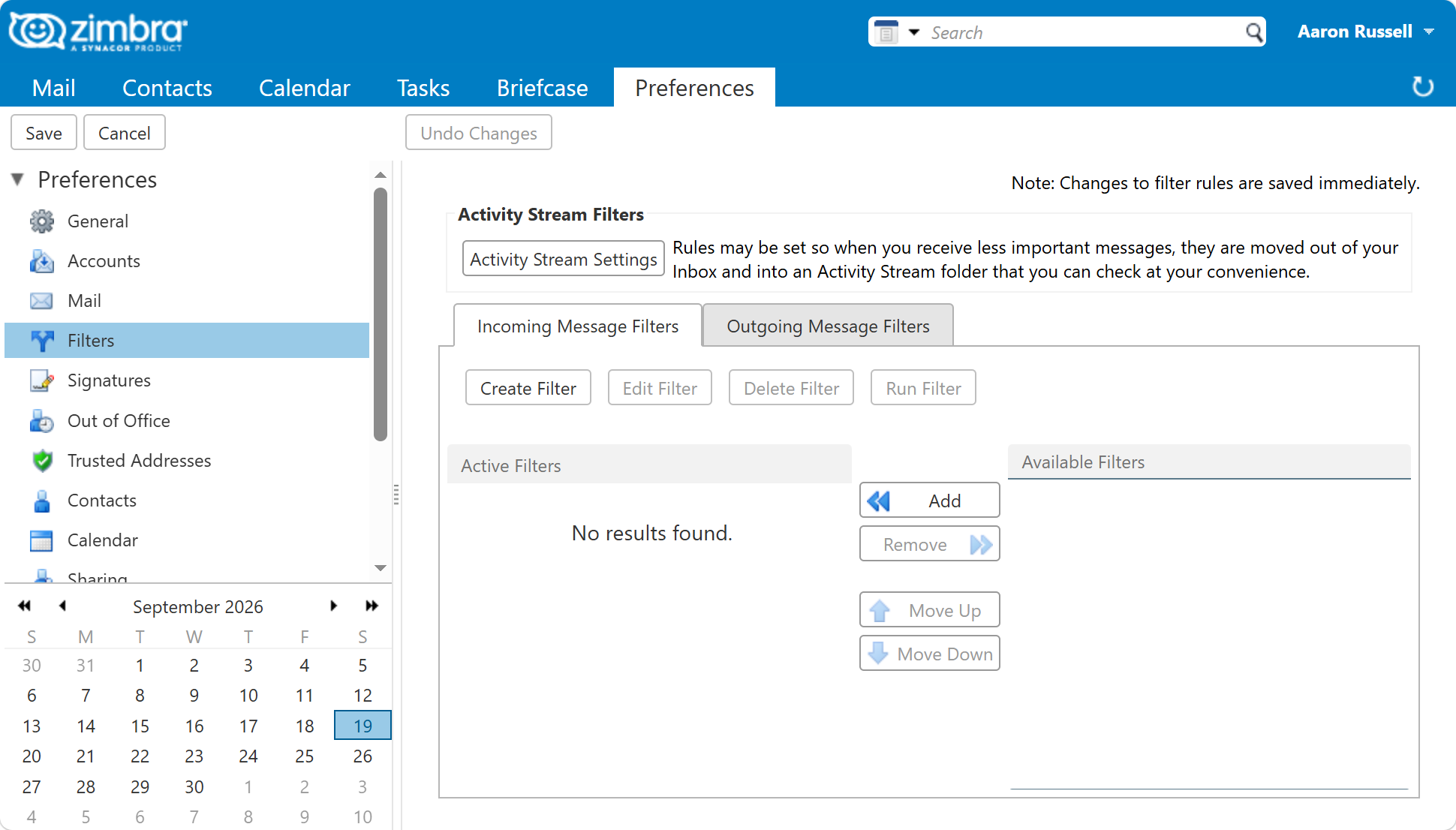
The web client checks every rule when it is saved and refuses invalid ones.
In the admin console - for administrators
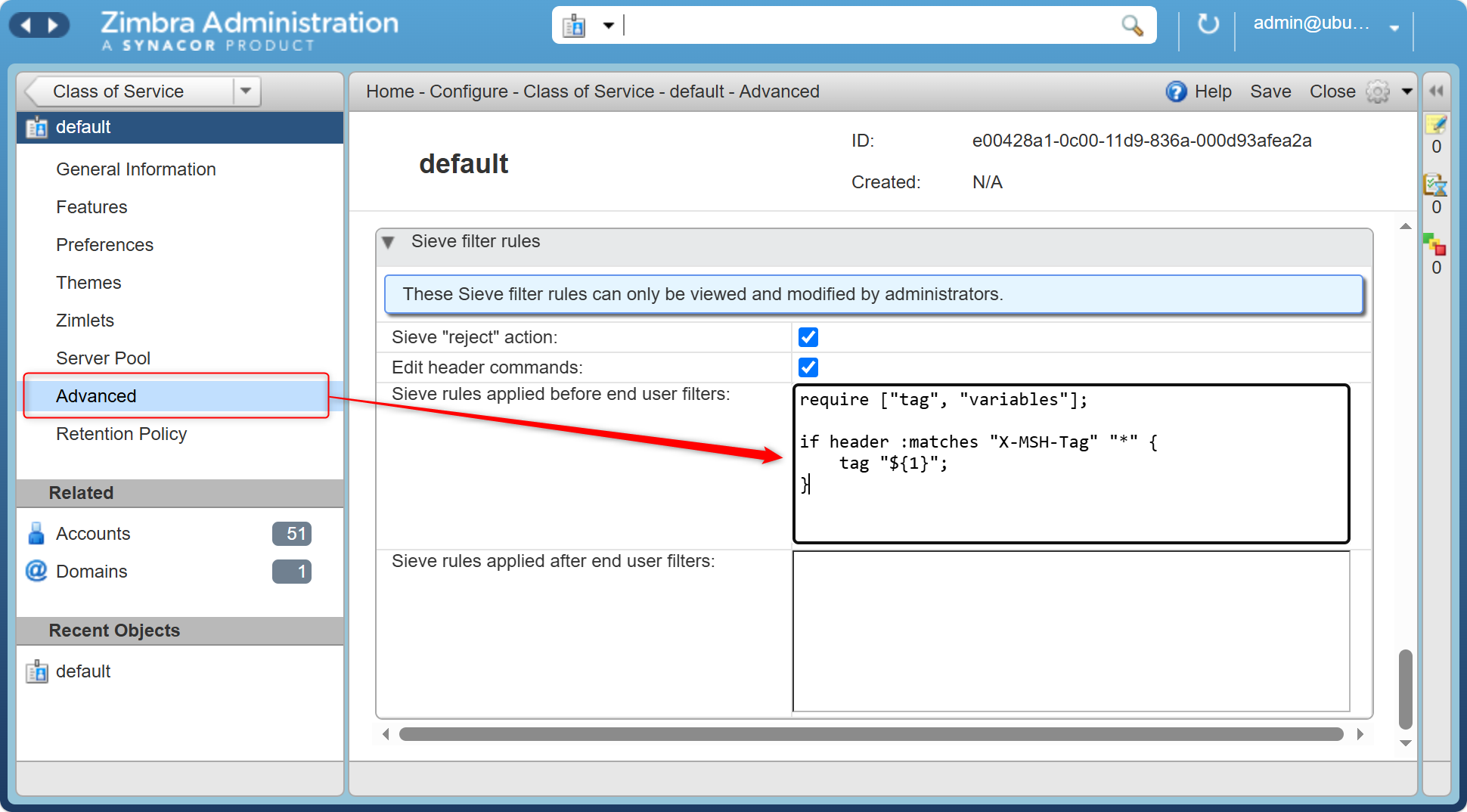
From Zimbra 9, the admin console can edit the admin scripts of a domain or a COS: open the domain or COS, go to Advanced and scroll to Sieve filter rules. On older versions, use the command line.
On the command line
All commands run on the Zimbra server as the zimbra user (sudo su - zimbra).
Admin scripts are set with zmprov. Save the script to a file first, then:
# set the domain's "before" script from a file
zmprov md example.com zimbraAdminSieveScriptBefore "$(cat /tmp/filter.sieve)"

# show it
zmprov gd example.com zimbraAdminSieveScriptBefore

# remove it
zmprov md example.com zimbraAdminSieveScriptBefore ""
Use zmprov mc for a COS and zmprov ma for a single account in the same way.
zmprov stores the script without checking it, so a typo only shows up when mail
arrives. Check the syntax before saving - for example on
checksieve.com, which runs in the browser. It does not know
Zimbra's own commands such as tag.
A user's own filter rules can be managed with zmmailbox, using the same building blocks
as the web client instead of Sieve text:
# add a rule: file messages whose subject contains "invoice" into /Invoices
zmmailbox -z -m user@example.com addFilterRule "Invoices" active any \
    header "subject" contains "invoice" fileinto "/Invoices" stop

# list the user's rules
zmmailbox -z -m user@example.com getFilterRules
Before you edit headers
Sieve can add and remove message headers with the editheader extension. On Zimbra it is
switched off by default, and Zimbra documents it as a feature of admin scripts. The web
client cannot build these commands either, so in practice they only ever appear in an admin
script. To enable it for a COS:
zmprov mc default zimbraSieveEditHeaderEnabled TRUE
From Zimbra 9, you can also tick Edit header commands in the admin console, in the same Sieve filter rules section shown above.
Sieve and MSH Zimbra Rules
Sieve runs at the very end of the mail path, when a message is stored in a mailbox. That limits what it can do: it changes only the copy kept in the recipient's own mailbox, and outgoing filters change only the sender's saved copy. Nothing a Sieve script does reaches the recipients on other servers.
MSH Zimbra Rules works earlier, while Postfix passes the message on, so its changes are part of the message every recipient gets. That is what server-side email signatures and disclaimers need. It can also refuse a message during the SMTP session, before Zimbra accepts it.
The two work well together. A policy rule with the Add header action can mark a message, and a Sieve script can then file or tag it by that header.
Links
- RFC 5228 - Sieve: An Email Filtering Language - the language specification
- IANA Sieve extensions registry - every standard extension and its RFC
- Zimbra wiki - Sieve - admin scripts with
zmprov, with examples - Zimbra blog - Using Sieve filters on Zimbra - worked examples on the command line
- Zimbra blog - Using Sieve filters via the admin console - the admin console fields in Zimbra 9
- Zimbra wiki - zmmailbox - the command-line mailbox tool, including filter rules
- Apache jSieve - the Sieve engine inside Zimbra