A consistent email signature is part of your brand. When every employee sends mail with the same logo, contact block, and legal footer, your company looks professional and stays compliant. The problem: Zimbra has no central, server-side signature management. Zimbra email signatures are per-user preferences applied by the mail client, not by the server, and there is no global signature setting for a domain.
To enforce a Zimbra signature for all users on all outgoing mail - whether it was sent from the Zimbra Web Client, Outlook, or a phone - you need a component sitting in the mail path. This page covers the manual zmprov approach and its drawbacks, then shows how MSH Zimbra Rules manages company-wide, personalized HTML signatures from a single web panel.
The manual way: setting Zimbra signatures with zmprov
The common DIY route is scripting zmprov to push a signature into every account's preferences. For a single user it looks manageable:
zmprov csig alice@example.com corporate \
  zimbraSigHtml '<div>Alice Smith<br>Sales Manager<br>Example Corp</div>'
zmprov ma alice@example.com zimbraPrefDefaultSignatureId \
  "$(zmprov gsig alice@example.com | awk '/zimbraSignatureId/ {print $2}')"
To roll it out company-wide you loop over all accounts and splice in each user's LDAP attributes yourself:
for account in $(zmprov -l gaa example.com); do
  cn=$(zmprov ga "$account" cn | awk -F': ' '/^cn:/ {print $2}')
  title=$(zmprov ga "$account" title | awk -F': ' '/^title:/ {print $2}')
  zmprov csig "$account" corporate \
    zimbraSigHtml "<div>$cn<br>$title<br>Example Corp</div>"
done
It runs, but it struggles with the realities of branded mail:
- Client-side only.
zimbraSignaturepreferences apply in the Zimbra Web Client. Mail sent from Outlook, mobile devices, or any IMAP/SMTP client goes out without the signature. - Nothing is enforced. Users can edit or delete the signature in their preferences at any time.
- Stale data. When a job title or phone number changes in the directory, the script has to be re-run for the signature to catch up.
- HTML is fragile. Escaping a full branded HTML template with inline images inside a shell loop breaks easily.
- No per-department control. Different signatures for sales, support, or a second brand means more scripts and more special cases.
Server-side Zimbra signatures with MSH Zimbra Rules
MSH Zimbra Rules applies signatures on the server, in the mail path. It installs on the Zimbra server and integrates with Zimbra's Postfix MTA through the milter protocol, so every message is signed no matter which client sent it. You design a branded HTML template once, personalize it with LDAP variables from the Zimbra directory - {firstName}, {jobTitle}, {mail}, {photo} and more - and the engine fills in each sender's details automatically, in both the HTML and the plain-text part of the message.
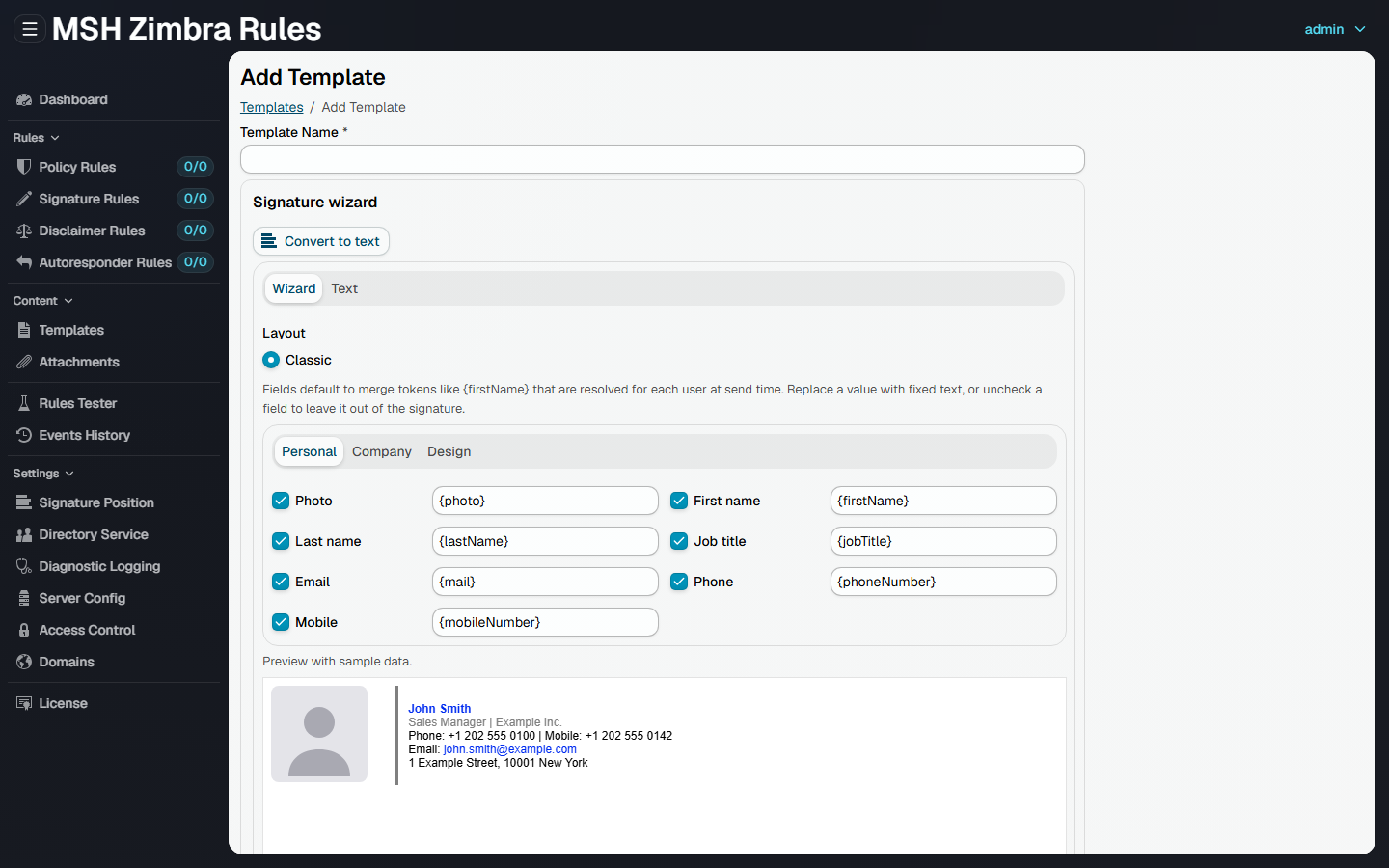
Set it up in four steps
- Install MSH Zimbra Rules on the Zimbra server and connect the milter engine to Zimbra's Postfix with a few
zmlocalconfigsettings. The quick start walks through it. - Design the signature as a branded HTML template in the web administrator panel - with the signature wizard, the visual designer, or by importing your existing HTML - using variables for the personal details.
- Target the senders with a signature rule - apply it company-wide, or scope it per domain, group, or user with the rule's conditions.
- Test and deploy using the rules tester, then turn the rule on for live mail.
Need different footers per team? Create one rule per group. When someone's title changes in the Zimbra directory, their signature updates automatically - no scripts to re-run.
What a server-side Zimbra signature gives you
- Every mail client. Outlook, Thunderbird, Apple Mail, iPhone and Android apps and the Zimbra Web Client all send mail with the same signature, because it is added by the server.
- Personalized from LDAP. Name, job title, department, phone numbers, address and photo come from the Zimbra directory, so the signature is always current.
- Smart templates. Conditional blocks and string helpers let one template adapt to each sender - a mobile number line only appears when the user has one.
- Correct placement in replies. The signature goes above the quoted reply or forward history, detected with configurable separator patterns, or replaces a fixed marker in the message.
- HTML and plain text. Each template has an HTML and a text version, so the signature also appears in plain-text mail.
- Rules, not scripts. Target by sender, group, domain, direction or schedule, and switch a rule off without deleting it.
- Safe with signed mail. Digitally signed and encrypted messages are passed through untouched.
Frequently asked questions
How do I set a Zimbra signature for all users?
Zimbra has no global signature setting. Signatures set with zmprov are stored per account and apply only in the Zimbra Web Client, so covering all users means scripting every account and repeating it whenever someone joins. MSH Zimbra Rules adds the signature on the server instead: one signature rule applies to all users in a domain, and each copy is filled with the sender's own name, job title and contact details from the Zimbra directory.
How do I add a company-wide email signature in Zimbra?
Zimbra signatures set with zmprov are client-side preferences that only apply in the Zimbra Web Client. To enforce a signature on every message regardless of the mail client, you need a component in the mail path. MSH Zimbra Rules applies centrally managed HTML signatures on the server, so all staff send mail with the same branded footer from any client.
Does the signature work for Outlook, Apple Mail and mobile clients?
Yes. The signature is inserted by the server while the message passes through Zimbra's Postfix MTA, so it does not matter which mail client sent it. Outlook, Thunderbird, Apple Mail, iPhone and Android mail apps and the Zimbra Web Client all get the same signature.
Can each user have a personalized Zimbra email signature?
Yes. MSH Zimbra Rules fills one signature template with LDAP variables from the Zimbra directory - {firstName}, {lastName}, {jobTitle}, {department}, {phoneNumber}, {mail} and more - so every user automatically gets a signature with their own name, title, and contact details. Conditional blocks hide a line when the value is empty, for example a missing mobile number.
Can the signature include the user's photo from the Zimbra directory?
Yes. The {photo} variable inserts the sender's directory photo into the HTML signature with the image data embedded in the message, so no external image hosting is needed. The size can be fixed, for example {photo:100} for a width of 100 pixels.
Where is the signature placed in replies and forwards?
By default the signature is inserted above the quoted reply or forward history, where the reader expects it, using a configurable set of reply separator patterns. Alternatively, a fixed text marker such as -- SIGNATURE -- in the message can be replaced with the signature.
Can different departments have different signatures?
Yes. Signature rules can target specific domains, groups, or users, so the sales team, support team, and executives can each have their own branded signature. Rules can also be limited to outgoing mail only, or to a schedule.
What happens to digitally signed or encrypted messages?
They are left untouched. Inserting a signature would break an S/MIME or PGP signature, and the body of an encrypted message cannot be changed, so signature rules skip such messages and record the reason in the processing trace.
Try it on your Zimbra server
MSH Zimbra Rules runs in demo mode right after installation, and a free 90-day trial license removes every limit. Signatures are one of four rule types - the same panel also manages disclaimers, autoresponders and attachment policies.