Troubleshooting Zimbra Sieve Filters: Why a Rule Does Not Fire
A Sieve filter that does not work rarely tells you why. Zimbra reports a syntax error only on one of the two ways to save a script, several actions fail by quietly doing nothing, and a message that no rule claimed looks exactly like a message every rule ignored. This is the order to check things in, from the cheapest test to the most thorough.
Part of the series on Everyday Uses for Sieve Mail Filters in Zimbra.
Narrowing it down first
Most problems fall into one of four groups, and knowing which one saves a lot of time.
| Symptom | Usually means |
|---|---|
| Nothing at all happens | The script is not where you think, or has a syntax error |
| The rule fires but one action does nothing | A silently disabled action - see below |
| The rule fires on the wrong messages | A match type or a test doing something other than you expected |
| It worked, then stopped | An earlier rule now claims the message first |
Step 1: Confirm the script is actually there
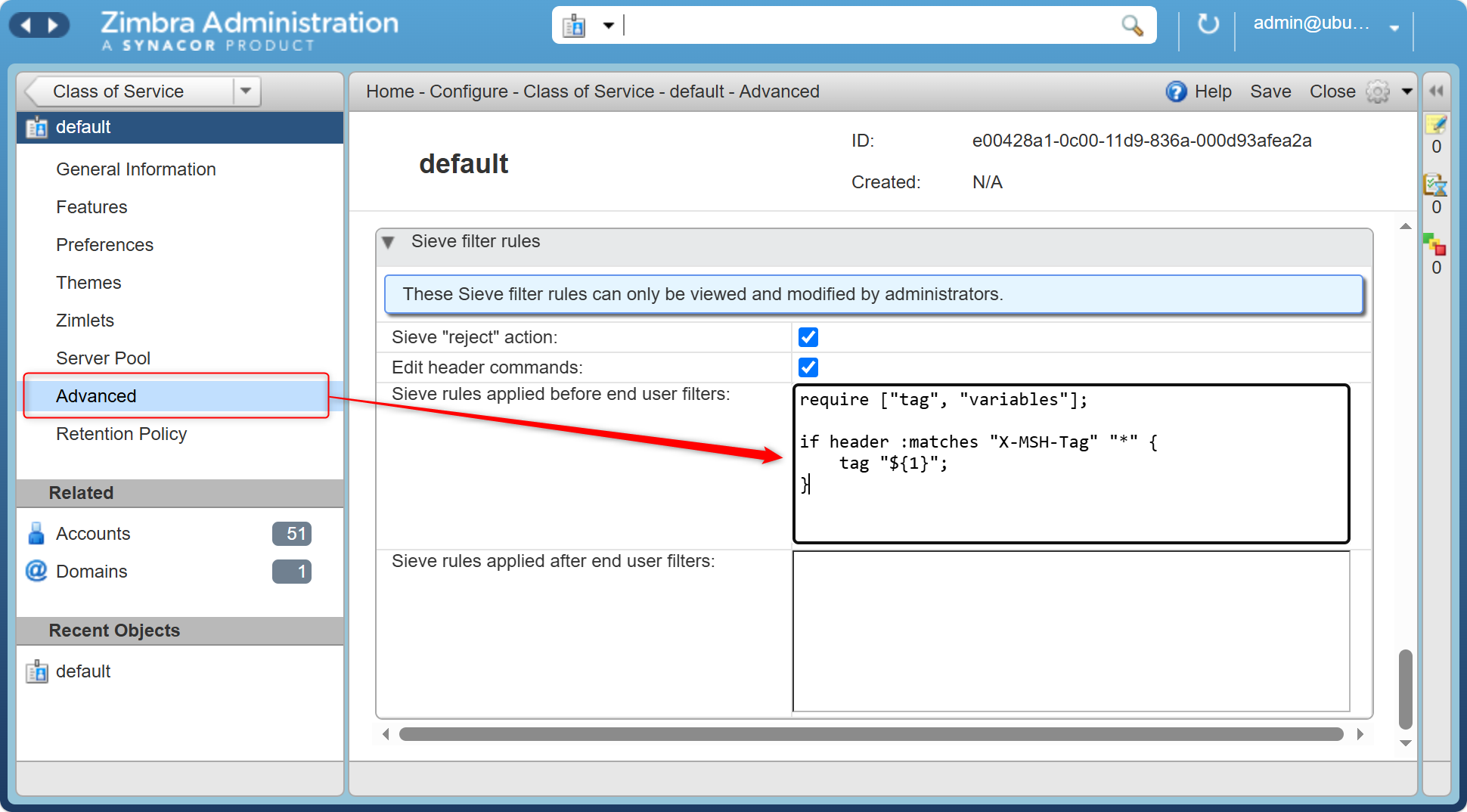
Zimbra reads six script attributes, three for incoming mail and three for outgoing. A script in the wrong one is the single most common cause of "nothing happens".
| Runs | Incoming | Outgoing |
|---|---|---|
| Before the user's filters | zimbraAdminSieveScriptBefore | zimbraAdminOutgoingSieveScriptBefore |
| The user's own filters | zimbraMailSieveScript | zimbraMailOutgoingSieveScript |
| After the user's filters | zimbraAdminSieveScriptAfter | zimbraAdminOutgoingSieveScriptAfter |
Read back what is really stored:
# the account's own filters
sudo su - zimbra -c 'zmprov ga user@example.com zimbraMailSieveScript'

# the admin scripts, at each level they can be set
sudo su - zimbra -c 'zmprov ga user@example.com zimbraAdminSieveScriptBefore'
sudo su - zimbra -c 'zmprov gc default zimbraAdminSieveScriptBefore'
sudo su - zimbra -c 'zmprov gd example.com zimbraAdminSieveScriptBefore'
Two things catch people here.
Admin scripts do not combine across levels. Zimbra uses the account's script if it has one, otherwise the COS script, otherwise the domain script. A domain script you are sure about will never run for an account that has its own.
A rule switched off in the web client is still in the script. Zimbra writes
disabled_if instead of if, so the rule survives editing but never matches. If you are
reading a script back and a rule looks correct but does nothing, check the first word:
disabled_if anyof (header :contains "subject" "newsletter") {
    fileinto "Newsletters";
}
Step 2: Check the script is valid
Zimbra validates a script on only one of the two ways to save it.
| How it was saved | Validated? |
|---|---|
Web client Filters, or the ModifyFilterRules SOAP call | Yes. Parsed, run against a dummy message, size-checked against zimbraMailSieveScriptMaxSize. An invalid script is refused and nothing is stored |
zmprov ma / md / mc on a script attribute | No. Stored exactly as given, mistakes included |
That asymmetry is why a script set with zmprov can be silently broken. The evidence turns
up in two places: as a filter error in the mailbox log when mail arrives, and as
service.PARSE_ERROR when the user opens the Filters tab.
grep -i -E "sieve|filter|PARSE_ERROR" /opt/zimbra/log/mailbox.log | tail -50
To check syntax before saving, checksieve.com runs entirely in
the browser, so internal addresses are not sent anywhere. It does not know Zimbra's own
keywords, so tag, flag, reply, replaceheader, log, attachment, me, list,
bulk and the rest will be reported as errors even though Zimbra accepts them. Use it to
check structure and brackets, not vocabulary.
Step 3: Turn on filter logging
This is the step most people skip, and it usually ends the investigation. Zimbra can log mail filtering in detail for a single account, without raising the log level for the whole server:
# log filtering for one account at debug level
sudo su - zimbra -c 'zmprov addAccountLogger user@example.com zimbra.filter debug'

# see which loggers are active for that account
sudo su - zimbra -c 'zmprov getAccountLoggers user@example.com'

# turn it off again
sudo su - zimbra -c 'zmprov removeAccountLogger user@example.com zimbra.filter'
aal, gal and ral are the short forms. zimbra.filter is the category for mail
filtering; zimbra.lmtp covers incoming delivery and is worth adding when you are not sure
the message is reaching the mailbox server at all.
Then watch the log while you send a test message:
tail -f /opt/zimbra/log/mailbox.log | grep -i -E "filter|sieve"
Account loggers do not survive a mailbox server restart, which is a feature - it is hard to leave one on by accident.
Step 4: Make the script say what it did
Log output tells you what Zimbra did. The log action tells you what your script thought,
which is usually the more useful half.
require ["log", "variables", "fileinto"];

log :info "script reached rule 1, subject is: ${subject}";

if address :domain :is "from" "example.com" {
    log :info "rule 1 matched";
    fileinto "Internal";
    stop;
}

log :info "rule 1 did not match, from is: ${from}";
log writes to the mailbox log at one of :fatal, :error, :warn, :info, :debug or
:trace. It is unaffected by every setting that silences other actions, which makes it the
one reliable way to tell "the condition never matched" apart from "the action was blocked".
The variables in that example are worth knowing about, because they are not documented
anywhere and they turn log into a way to dump the message. While variables is in the
require line, Zimbra exposes every header as a variable named after it in lower case,
so ${from}, ${to}, ${x-spam-score} and the rest all work without a set of your own.
Two extras come with them: ${subject}, which is the decoded subject rather than the raw
header, and ${body}, which is the text body.
require ["log", "variables"];

log :info "from=${from} to=${to} subject=${subject} spam=${x-spam-score}";
One line like that at the top of a script usually explains the problem immediately, because
it shows the values the tests below are actually comparing against. Leave out variables
and nothing is substituted - Zimbra logs that the capability was not declared and passes
the text through with the ${...} intact, which is itself a useful clue.
The other technique is to stamp a header, so the delivered message carries a record of which rules fired:
require ["editheader"];

if header :contains "subject" "invoice" {
    addheader "X-Rule-Fired" "invoice";
    fileinto "Invoices";
}
Open the delivered message, choose Show Original, and the header is either there or it
is not. This needs editheader enabled, which is itself one of the silent failures below.
Step 5: Test without waiting for real mail
Save a message as .eml - open it in the web client, choose Show Original, save the
page - and deliver it on demand.
# deliver straight to the mailbox server over LMTP, the same way Postfix does
sudo su - zimbra -c 'zmlmtpinject -r user@example.com -s sender@example.com -v /tmp/message.eml'
This runs all three incoming scripts exactly as a real delivery would, but skips Postfix,
the milter and amavis. That is usually what you want when debugging Sieve alone. Note that
skipping amavis means no X-Spam-* headers are added, so a rule that reads a spam score
will not match an injected message unless the saved .eml already contains them.
When the rule depends on something added earlier in the mail path, send it through Postfix instead:
swaks --server localhost --from sender@example.com --to user@example.com --data /tmp/message.eml
To re-run a user's named filters over mail already in a folder, use Run Filter in Preferences > Filters. It only runs the user's own named rules, not the admin before and after scripts, so it is not a substitute for a real delivery.
The silent failures
These are the actions that do nothing without reporting anything. If a rule is definitely
matching - the log line proves it - the cause is almost certainly here.
addheader, deleteheader and replaceheader check two settings and return quietly
if either blocks them:
sudo su - zimbra -c 'zmprov gc default zimbraSieveEditHeaderEnabled'   # must be TRUE, defaults to FALSE
sudo su - zimbra -c 'zmprov gc default zimbraSieveImmutableHeaders'    # the header must not be in this list
The immutable list defaults to Received, DKIM-Signature, Authentication-Results,
Received-SPF, Message-ID, Content-Type, Content-Disposition,
Content-Transfer-Encoding, MIME-Version and Auto-Submitted.
reject works only while zimbraSieveRejectMailEnabled is TRUE, which is the
default. Set to FALSE, the message is kept instead of refused.
notify has two different grammars, chosen by
zimbraSieveNotifyActionRFCCompliant. The positional form applies while it is FALSE,
which is the default; the RFC 5435 form with mailto: applies when it is TRUE. Writing
the wrong one for your server is a common reason a notify rule saves cleanly and never
fires.
fileinto does not create folders. A message aimed at a folder that does not exist
lands in the Inbox, which looks exactly like the rule not matching. tag behaves the
opposite way and creates a tag that is missing, so do not reason from one to the other.
The usual suspects
When the rule fires on the wrong messages, or not at all, work down this list.
A missing require. Every extension has to be named at the top, Zimbra's own actions
included. tag, flag, reply, log, envelope, variables, relational, fileinto
and copy all need one.
:matches is anchored. It compares against the whole header value, so
:matches "from" "anna@example.com" fails on the real header
Anna Nowak <anna@example.com>. Put * on both sides, or use :contains, or use
address which parses the header for you.
me takes one comma-separated string. me :in "to,cc" is correct; me :in ["to", "cc"]
is not, and fails quietly.
The numeric comparator treats non-numbers as infinite. Under RFC 4790, a string that
does not start with a digit "represent[s] positive infinity", so a negative spam score of
-2.23 compares as greater than everything. See
File Suspected Spam by Its Score for the full trap
and the way round it.
body supports only :contains on Zimbra. The :matches, :is, :raw and :text
variants from RFC 5173 are not implemented.
date is not the RFC 5260 test. Zimbra's version compares the Date header against a
date written yyyyMMdd, with only :before and :after.
An earlier rule already claimed the message. stop ends the script, and the admin
"before" script runs ahead of every user filter. A rule that stopped working after someone
else made a change is usually this.
envelope and address disagree. They read different things - the SMTP transaction
versus the message headers - and for forwarded or list mail they often differ. If a rule
matches in testing and not in production, try the other one.
The message never reached Sieve. Sieve runs at final delivery, so a message refused by Postfix, quarantined by amavis or blocked by a milter never reaches any script. If the log shows nothing at all for the message, the problem is upstream. See Zimbra Sieve Filters: An Introduction for where Sieve sits in the mail path.
A worked order
Putting it together, for a filter that is not doing anything:
zmprov gathe script attribute and read what is really stored.- Check the first word of the rule is
ifand notdisabled_if. grep -i sieve /opt/zimbra/log/mailbox.logfor a parse error.zmprov aal user@example.com zimbra.filter debug.- Add a
log :infoline at the top of the script and one inside the rule. zmlmtpinjecta saved message and read the log.- If the rule matched but the action did nothing, work through the silent failures above.
Six of those seven steps cost nothing and take a minute each, which is why it is worth doing them in order rather than guessing.
Related reading
- Sieve Actions in Zimbra - every action, and the settings that disable them
- Sieve Conditions in Zimbra - every test and match type
- Zimbra Sieve Filters: An Introduction - where scripts are stored and how the levels combine