MSH Zimbra Rules vs cbpolicyd: Rate Limits and SMTP Policies Compared
Sooner or later every Zimbra administrator needs to stop a compromised mailbox from sending ten thousand messages overnight. The answer that is already on the server is cbpolicyd, the policy daemon Zimbra bundles and leaves switched off. Since version 1.4, MSH Zimbra Rules does the same jobs with SMTP rules and limit rules. Here is how the two compare, where each one is stronger, and how to move from one to the other.
Part of the series on cbpolicyd on Zimbra.
They answer at the same moment
Both act during the SMTP conversation, before your server has accepted the message. A refused message is never received, so it costs no disk, no virus scan and no bounce of your own.


The difference is in what each one can see and do. cbpolicyd looks at the envelope: who connects, who sends, who receives and how often, and answers yes or no. MSH Zimbra Rules answers the same questions with its SMTP rules and limit rules, and as a milter it then also reads and changes the message itself: signatures, disclaimers, attachments, banners.
At a glance
| cbpolicyd | MSH Zimbra Rules | |
|---|---|---|
| Ships with Zimbra | ✓, switched off | ✗, installed separately |
| Price | Free | Commercial license, free trial |
| Maintained | ✗, upstream is frozen since 2013 | ✓ |
| Configured with | SQL statements in sqlite3 | A web administrator panel |
| Sending limits | Quotas and accounting modules | Limit rules |
| Allow and refuse by client, sender, recipient | Access control module | SMTP rules |
| HELO checks | CheckHelo module, with its own heuristics | HELO name condition, by pattern |
| Greylisting | ✓ | ✗ |
| SPF checks | ✓ | ✗ |
| DKIM verification | ✗ | ✓ |
| Several MTA servers | One database per server | One set of rules and shared counters for all servers |
| Try a rule before it is live | ✗ | Rules Tester, with a simulated SMTP connection |
| See what was refused | cbpolicyd.log and SQL queries | SMTP Events page |
| Change the message | ✗ | ✓, with policy, signature, disclaimer and autoresponder rules |
Rate limits
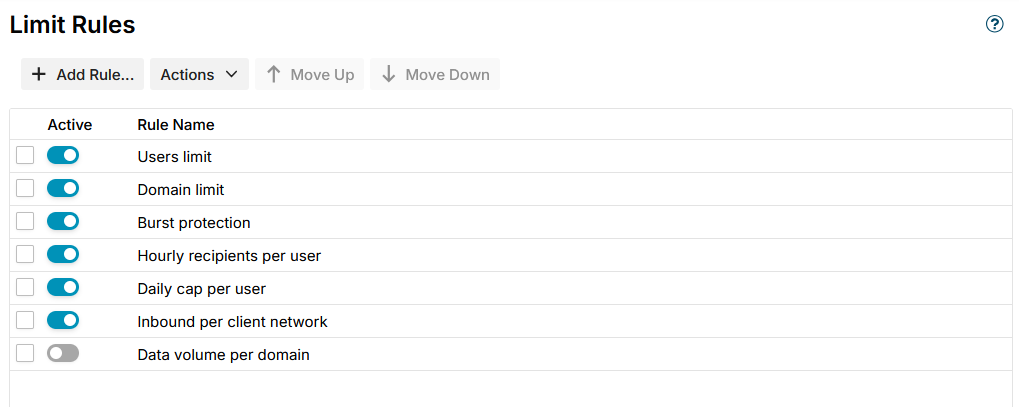
This is why most people turn cbpolicyd on, and where the two are closest. A cbpolicyd quota and an MSH Zimbra Rules limit rule say the same thing: at most this many messages, or this much mail, per period, for each sender, domain, recipient or network.
| cbpolicyd quotas | MSH Zimbra Rules limit rules | |
|---|---|---|
| Who gets a counter | Track, such as Sender:user@domain, Sender:@domain or SenderIP:/24 | Counted for each: sender, sender domain, recipient, recipient domain, client network or the whole rule |
| Period | A rolling window in seconds. Calendar periods need the accounting module | Sliding seconds, minutes, hours or days, or a calendar day, week or month |
| Limit by | Message count or total size | Number of messages or total size |
| Over the limit | DEFER, REJECT, HOLD or DISCARD | Defer or reject, with your own reply text |
| A message to five recipients | Counts five times, because Postfix asks at every RCPT TO | Counts once, or five times if you choose so |
| A logged-in sender | Counted by the Track you choose, usually the sender address | Counted by the login, whatever address it puts in MAIL FROM |
| Several MTA servers | Each server counts on its own, so a sender gets the limit once per server | One counter on all servers |
| See the counters | SELECT on quotas_tracking | The Message Limits page, fullest first |
| Let a sender go again | DELETE FROM quotas_tracking ... | Reset on the counter, on every server at once |
| Tell the administrator | Not built in, read the log | An e-mail to the addresses in Notify when a counter is full |
Two rows matter more than they look.
Counting by login. A compromised account usually keeps its login and changes the sender address with every message. A limit that counts by address then never fills. MSH Zimbra Rules counts a logged-in sender by its login, so changing the address does not help.
Shared counters. With two MTA servers behind one MX, cbpolicyd keeps two separate SQLite databases, and a sender who reaches both gets twice the limit. MSH Zimbra Rules counts in one place for all servers, and its Reset reaches all of them.
The limit rules, step by step, are in Limit rules. The same jobs in cbpolicyd are in cbpolicyd Quotas and cbpolicyd Accounting.
Access control
The cbpolicyd access control module attaches a verdict to a policy, and the policy's groups and members decide who it applies to. SMTP rules do the same with conditions and exceptions, and with an extra choice of when in the conversation the rule is asked:
| Stage | Asked at | What a matching rule refuses |
|---|---|---|
| Connect | The client connects | Every message on the connection |
| HELO | HELO or EHLO | Every message on the connection |
| Sender | MAIL FROM | The whole message |
| Recipient | RCPT TO, for each recipient | Only that recipient |
| Data | DATA | The whole message |
A rule can match the client address or network (IPv4 and IPv6), the client host name, the HELO name, the login, the sender, the recipients, and whether the client came in on port 25, on the submission ports or from the webmail of a mailbox server. Networks and addresses used by many rules, such as your own networks, live once in an address list, much like a cbpolicyd group.
cbpolicyd has more verdicts. HOLD parks a message in the hold queue, DISCARD drops it
silently and REDIRECT delivers it elsewhere. An SMTP rule only refuses, permanently,
temporarily or with a reply of your own, so the sender always learns about it. To drop
a message silently or send it elsewhere, MSH Zimbra Rules uses policy rules once the
message is received, with Block message
and Forward message.
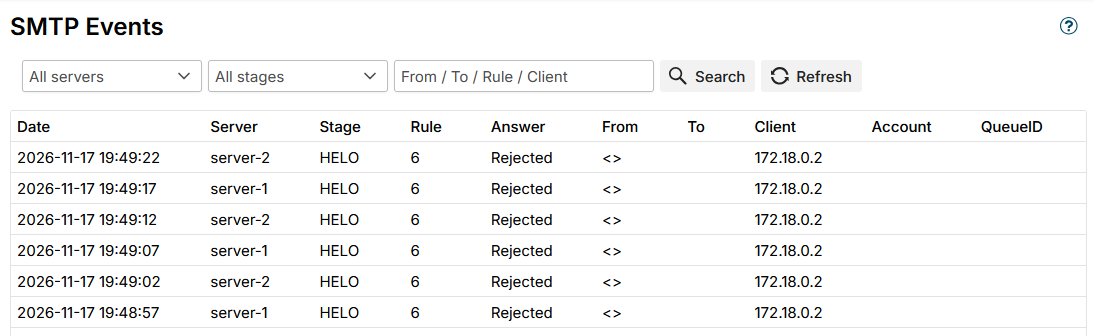
Every refusal shows on the SMTP Events page, from every server, with the stage, the rule and the reply the client got:
HELO checks
cbpolicyd's CheckHelo module has heuristics of its own: it can require a resolvable, RFC-compliant HELO name and notice a client that changes its HELO name from connection to connection. MSH Zimbra Rules has a HELO name condition that matches names exactly, with wildcards or with a regular expression. That covers the most useful HELO check, refusing clients that greet with your own host name, but not the randomization tracking. See cbpolicyd HELO Checking for what a HELO name can tell.
What only cbpolicyd does
- Greylisting. MSH Zimbra Rules has no greylisting. If you rely on it, keep cbpolicyd for that, see cbpolicyd Greylisting.
- SPF checks during the session. There is no SPF condition in MSH Zimbra Rules. Zimbra's spam filter scores SPF after the message is received.
- It costs nothing and is already installed. For one server and a few quotas that rarely change, that can be enough.
What only MSH Zimbra Rules does
- A web interface instead of SQL. Rules, address lists and counters are edited in the administrator panel, are part of Backup & Restore and reach every server.
- A test before a rule goes live. The Rules Tester takes a simulated connection, with a client address, port, HELO name, login and envelope, and shows what each recipient would get.
- Notices and a page for the counters, so you learn about a compromised account from an e-mail and not from a blocklist.
- DKIM verification before any rule changes the message, with a condition on the result.
- Everything after the SMTP session, which is not cbpolicyd's job at all: signatures, disclaimers, autoresponders, attachment rules and warning banners.
Can they run together?
Yes. cbpolicyd is asked as a Postfix policy service and MSH Zimbra Rules as a milter, so both are asked for every message, and either one can refuse it. That makes a mix possible, for example cbpolicyd for greylisting and MSH Zimbra Rules for the sending limits.
Avoid two limits for the same thing. A sender held back by a cbpolicyd quota and an MSH Zimbra Rules limit at once is hard to explain to anyone. Once your limit rules are in place and tested, switch the cbpolicyd quotas off on each MTA server:
sudo su - zimbra -c 'zmprov ms $(zmhostname) zimbraCBPolicydQuotasEnabled FALSE'
sudo su - zimbra -c 'zmmtactl restart'
Moving a quota from cbpolicyd
| cbpolicyd | MSH Zimbra Rules |
|---|---|
| A policy with its groups and members | A limit rule with its conditions and exceptions |
Track Sender:user@domain | Counted for each Sender |
Track Sender:@domain | Counted for each Sender domain |
Track Recipient:user@domain | Counted for each Recipient |
Track SenderIP:/24 | Counted for each Client network, IPv4 network /24 |
Period 3600 | Per 1 hours |
CounterLimit with MessageCount | Limit Number of messages, At most |
CounterLimit with MessageCumulativeSize | Limit Total size, in KB, MB or GB |
Verdict DEFER | Over the limit Defer the message |
Verdict REJECT | Over the limit Reject the message |
Data | Reply |
| A group of trusted networks as a negated member | An exception Client address in the list Trusted networks |
One thing to adjust: if your cbpolicyd quota counted per recipient without meaning to, because Postfix asks once per RCPT TO, its limit was effectively divided by the average number of recipients. A limit rule counts each message once by default, so the same number is now more generous.
Which one to use
Stay with cbpolicyd if you have one MTA server, a handful of quotas that never change, someone who is at home in SQL, and you need greylisting.
Use MSH Zimbra Rules if you want to see and change your limits in a browser, have more than one MTA server, want to know when an account is caught, or want to test a rule before it refuses real mail. If you already use it for signatures or disclaimers, the SMTP and limit rules come with it.
Related reading
- cbpolicyd on Zimbra: An Introduction - what cbpolicyd is, where it came from and the state it is in
- cbpolicyd Quotas: Rate Limiting Mail on Zimbra - the quotas module in detail
- SMTP rules and Limit rules - the MSH Zimbra Rules side in the documentation
- MSH Zimbra Rules vs Sieve - the same comparison at the other end of the mail path
Want to try the limit rules on your own server? Start a free trial.