Message count based on sender
This condition lets you filter messages based on how many messages a matching sender has sent within a time interval. This is useful for detecting mass mailing, throttling overly active senders, or spotting compromised accounts that suddenly start sending large volumes of mail.
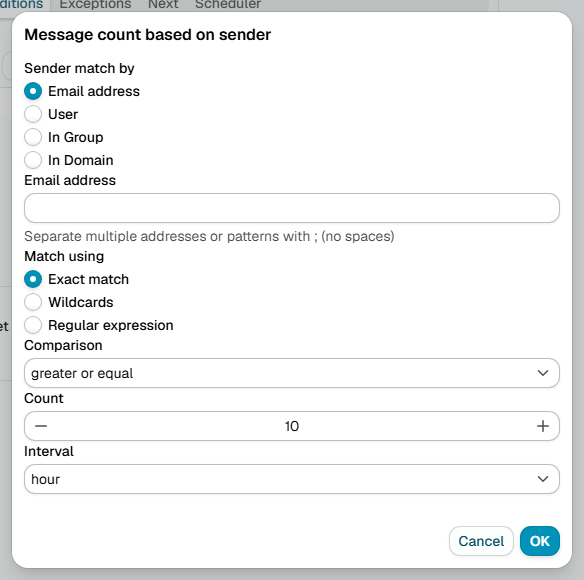
Sender match by
Choose which senders are counted:
Email address
Enter the sender's email address and choose how to match it:
- Exact match - The email address must match exactly (e.g.
john@mshsoftware.com) - Wildcards - Use
*to match patterns (e.g.,*@mshsoftware.commatches anyone from that domain) - Regular expression - Use advanced pattern matching for complex rules
You can enter multiple addresses or patterns separated with ; (no spaces).
User
Select a specific user from the list. Only messages sent by that user are counted.
In Group
Choose a group from the list. Messages are counted when the sender belongs to that group.
In Domain
Select a domain. Messages are counted when the sender's email address belongs to that domain.
Comparison
Set how to compare the message count:
- Equal - Exactly matches the number you specify
- Not equal - Any count except the number you specify
- Greater than - More messages than the specified number
- Greater or equal - At least the specified number of messages
- Less than - Fewer messages than the specified number
- Less or equal - No more than the specified number of messages
Count
Number of messages to compare against.
Interval
The time window the messages are counted in, for example the last hour. The condition looks at how many matching messages were sent within this interval and compares that number against the count.
Additional resources
- Domains - read more about domains, users and groups
- For information about regular expressions you could check regular-expressions.info or regexone.com