External script
This condition runs a script on the mail server for the message and decides by the script's exit code or its output. Use it for checks the built-in conditions cannot do - a virus scan with ClamAV, a lookup in a CRM or customer list, or a query to another system.
The condition is available in the conditions and exceptions of policy, signature, disclaimer and autoresponder rules. You find it at the top level of the condition menu, as External script.
Scripts run only from the scripts directory of the server, /opt/msh-zr/scripts by default, which ships with two sample scripts, accept.sh and reject.sh. See Prepare scripts for how to add your own, which scripts may run and how to write them safely.
Script
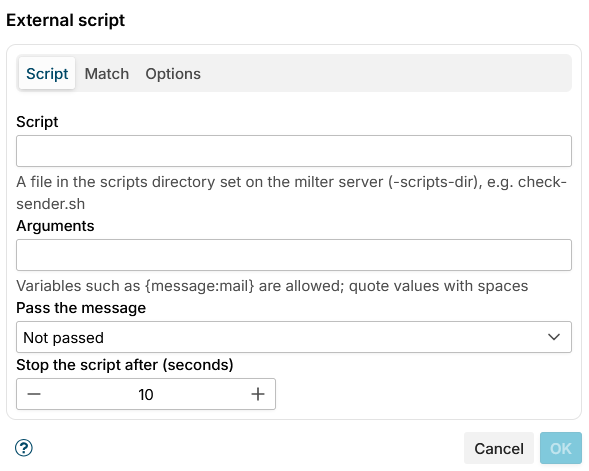
Script: The file to run, relative to the scripts directory, for example check-sender.sh.
Arguments: Arguments passed to the script. Variables such as {message:mail} can be used; each variable stays a single argument even when its value contains spaces. Put a value with spaces in double quotes. {message_file} is replaced with the path of a temporary file holding the message.
Pass the message:
- Not passed (default) - the script gets the message details from the environment variables and arguments only.
- As a file (MSH_MESSAGE_FILE) - the message is written to a temporary
.emlfile, readable only by the application user, and its path is passed inMSH_MESSAGE_FILE. The file is deleted when the script ends. - On standard input - the message is passed on the script's standard input.
Stop the script after (seconds): The timeout, from 1 to 300 seconds, 10 by default. A script that runs longer is stopped, together with any processes it started. Above 60 seconds the dialog warns that Postfix waits at most 300 seconds for the milter (milter_content_timeout), so keep scripts well below that.
Every script also gets the sender, the recipients, the subject and other message details in MSH_* environment variables, see Environment variables.
Match
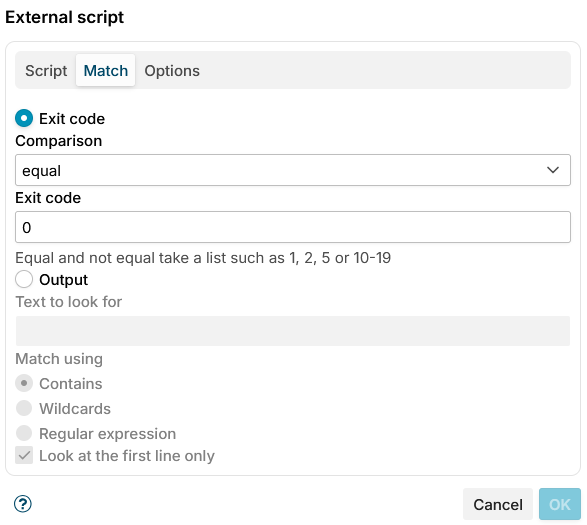
Choose what decides whether the condition matches.
Exit code (default): Compare the script's exit code.
- Comparison - equal, not equal, greater than, greater or equal, less than, or less or equal.
- Exit code - the value to compare with,
0by default. Equal and not equal take a list of codes and ranges, such as1, 2, 5or10-19; the other comparisons take a single number.
Output: Look for a text in the script's standard output (up to 64 KB is read).
- Text to look for - the text or pattern.
- Match using - Contains (default), Wildcards or Regular expression.
- Look at the first line only (on by default) - check only the first line of the output instead of all of it.
Options
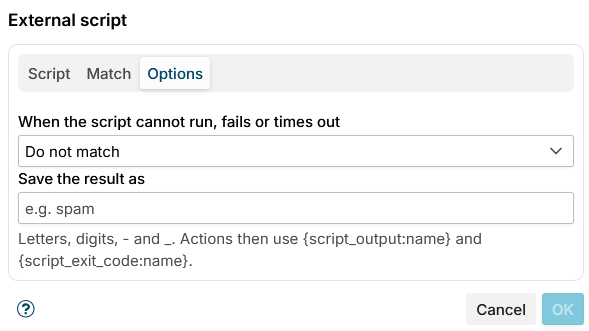
When the script cannot run, fails or times out:
- Do not match (default) - the condition is not met.
- Match - the condition is met. Choose this when a failed check should rather block than let a message through.
This also applies when the script is refused, for example because external scripts are not enabled, and when too many scripts are already running and none finishes within the timeout.
Save the result as: A name for the result, for example spam. The actions of the same message can then use it:
| Variable | Value |
|---|---|
{script_output:name} | The script's output, trimmed |
{script_exit_code:name} | The script's exit code |
Both are empty when the script did not run for the message, was refused, failed or timed out. The name is not case-sensitive. For example, the Add header action can add X-Spam-Score: {script_output:spam}.
Click OK to save the condition. OK is enabled only when a script is given, the timeout is valid, and the exit code or the text to look for is filled in.
One run per message
A script runs once per message, however many rules use it: when another condition runs the same script with the same arguments, message input and timeout for the same message, it reuses the first result.
Examples
Try the condition with the shipped samples - reject.sh always exits with 1:
- Script
reject.sh, arguments-- {message:envelope:sender} {message:envelope:recipients} {message:subject}. - Match on Exit code, equal
1. - Action: Block message. Every message the rule applies to is now blocked; swap in
accept.shwith equal0to see the opposite.
Virus scan with ClamAV - a script of your own that runs clamdscan on the message file:
- Pass the message As a file and run
clamdscan --no-summary "$MSH_MESSAGE_FILE"in the script. - Match on Exit code, equal
1-clamdscanexits 0 for a clean message, 1 when a virus was found and 2 on errors. - Set When the script cannot run, fails or times out to Match, so a message the scanner could not check is not let through.
- Action: Block message.
No disclaimer for customers - a script that checks MSH_RECIPIENTS against a list of customer addresses or domains and exits with 0 when one is found:
- Use it as an exception of a disclaimer rule.
- Match on Exit code, equal
0.
Testing
The Rules tester does not run scripts by default. On the Scripts tab of a test message, set the Simulated script exit code and Simulated script output that every External script condition gets instead.
Tick Run the scripts on this server instead to run the scripts for real with the test message. This option is available only when the web app was started with a scripts directory, which is the case unless SCRIPTS_DIR is empty.
Processing trace
The message processing trace shows the command line, the exit code, the run time and the first 200 characters of the output and error output, for example:
Running script clamav-scan.sh.The script finished with exit code 1 in 412 ms.The script was not run: External scripts are not enabled on this server.Script reject.sh already ran for this message, using its result.
A refused, failed or timed out script is also reported in the server log, once a minute per script and problem.
Additional resources
- Prepare scripts - set up the scripts directory, add your own scripts and write them safely
- Run executable - run a program as an action, after a rule matched; it runs programs from the same directory under the same rules
- Variables - variables that can be used in the arguments