Deployment layouts
MSH Zimbra Rules is made of three services. They all ship in the same package, msh-zr-<VERSION>.tgz, so every host gets the same files and you choose which services to enable.
| Service | Unit | Port | What it does | Where it runs |
|---|---|---|---|---|
| Web admin | msh-zr-web.service | 7081 (HTTP or HTTPS) | The administrator panel. Holds the rules and settings, syncs users and groups from the Zimbra LDAP, owns the license and sends everything to the servers. | The Zimbra server on a single server, a web admin server of its own with several MTA servers |
| Node | msh-zr-node.service | 7082 (HTTPS) | Receives the rules and settings from the web admin and keeps a local copy for the milter. Reports the milter's status and message history back. | Every MTA host |
| Milter | msh-zr-milter.service | 7080 | Processes the mail Postfix hands it and applies the rules. | Every MTA host |
The web admin connects to the node on each MTA host. Nothing on an MTA host connects to the web admin, and the milter only talks to its own node through local files. Each MTA keeps filtering mail with the last rules it received when the web admin is stopped or unreachable.
Single server
Everything runs on one host: one Zimbra server with its MTA and LDAP, and all three MSH Zimbra Rules services.
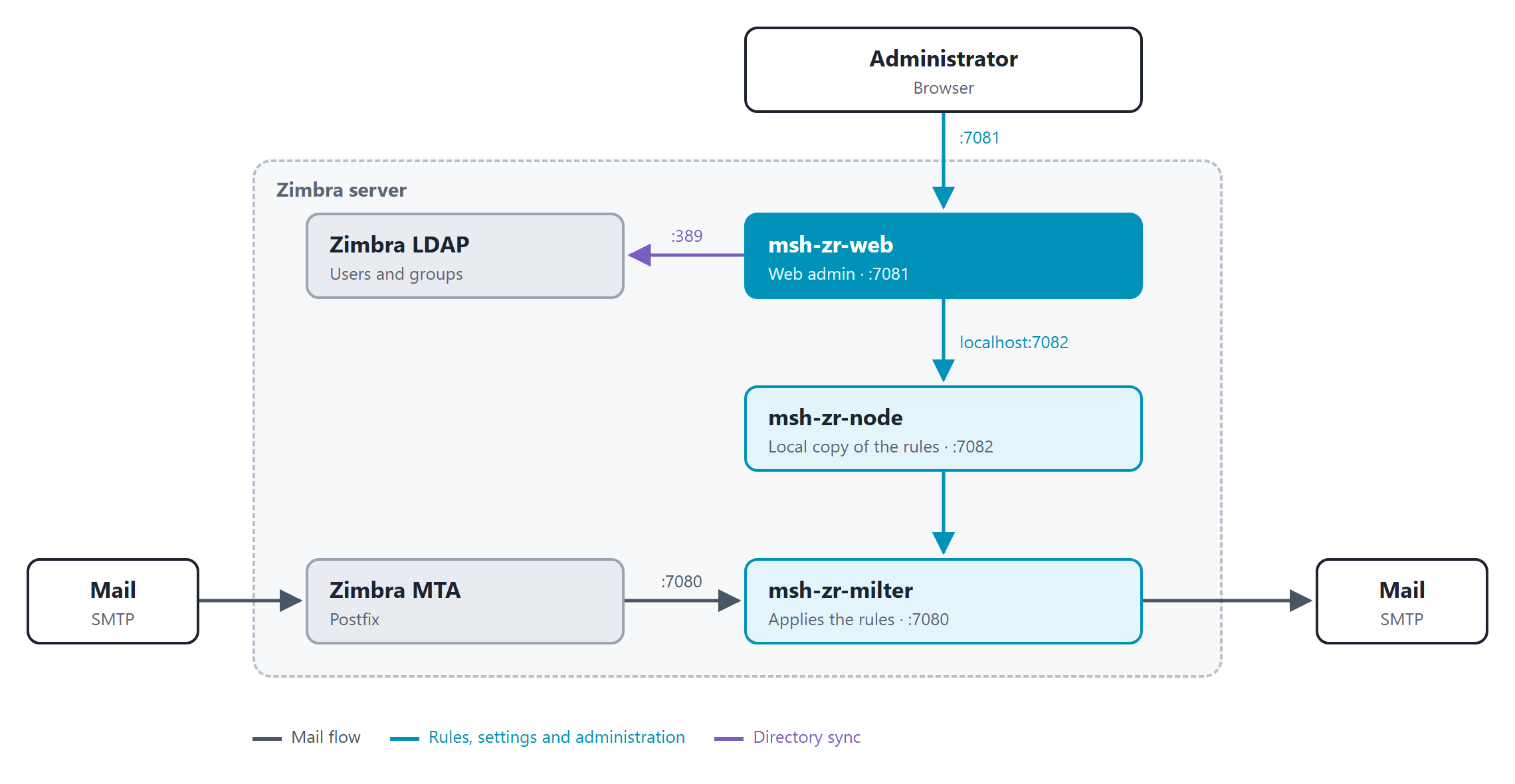
The web admin finds the node on the same host by itself and lists it on the Servers page as This server, so there is nothing to connect by hand.
Install with Single server and Zimbra configuration.
Multiple servers
A Zimbra installation with two or more MTA servers. Every MTA server gets its own node and milter. The web admin runs on a server of its own and manages them all.
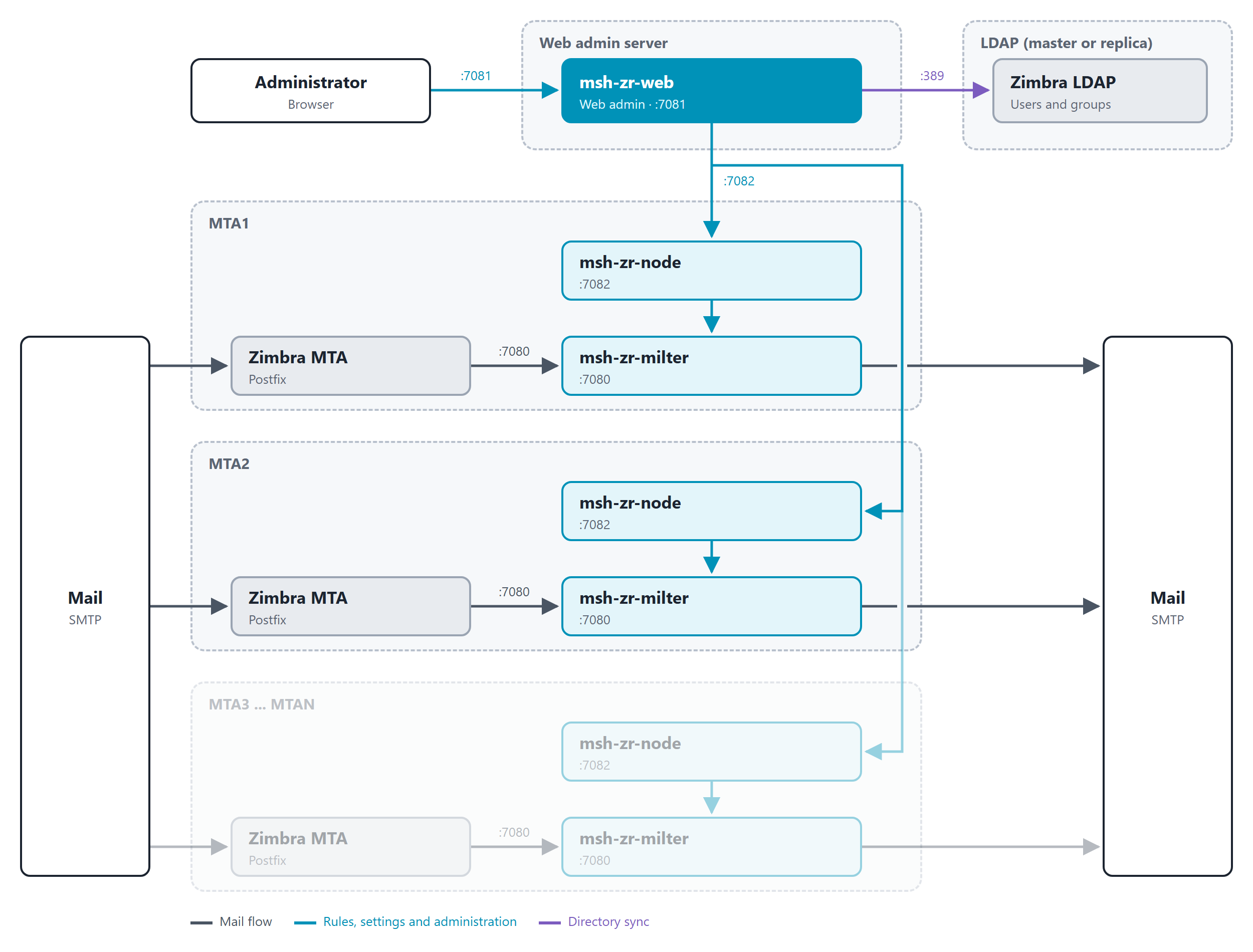
- The web admin server runs only the web admin. See Web admin server.
- Every MTA server runs only the node and the milter. See MTA servers.
- The web admin reaches each MTA server on port
7082, and you add each one on the Servers page with the token from that server. - The Zimbra LDAP is only read by the web admin, to sync users and groups. If your Zimbra installation has several LDAP servers (a master and replicas), connect the Directory service to one of them, the master or a replica that the web admin server can reach.
- Rules and settings are edited once, in the web admin, and sent to every MTA server. Message history shows the messages of all servers together, and message-count conditions count the messages of all servers together.
Ports and firewall
| From | To | Port | Needed for |
|---|---|---|---|
| Administrators' browsers | Web admin server | TCP 7081 | The administrator panel |
| Web admin server | Every MTA server | TCP 7082 | Sending rules and settings, reading status and message history |
| Web admin server | Zimbra LDAP | TCP 389 (or your LDAP port) | Syncing users and groups (Directory service) |
| Zimbra MTA | Milter on the same host | TCP 7080, localhost | Mail processing |
The milter listens on all interfaces, but only the MTA on the same host needs it. Do not open port 7080 to the network. Open 7082 only to the web admin server, and 7081 only to administrators.
What's next
- Requirements - operating system, Java and memory for each host
- Install - the installation steps for each layout