Directory service
The Directory Service page syncs users, groups and domains from Zimbra's built-in OpenLDAP. Once synced, users and groups become available throughout the application - you can use them when defining rule conditions to match messages by sender or recipient, and their attributes fill the placeholders in signature templates.
The sync is multi-domain: every mail domain found in the directory is imported, together with its users and groups. The results are browsable on the Domains page.
Aliases are imported as well, from the zimbraMailAlias attribute, for accounts and for distribution lists alike, and are listed on the user's and the list's page. Account aliases let the Message sender and Message recipient conditions match a message sent to or from an alias as if it used the primary address. List aliases work the same way for the Group option of both conditions, which matches a message addressed to, or sent from, the list itself.
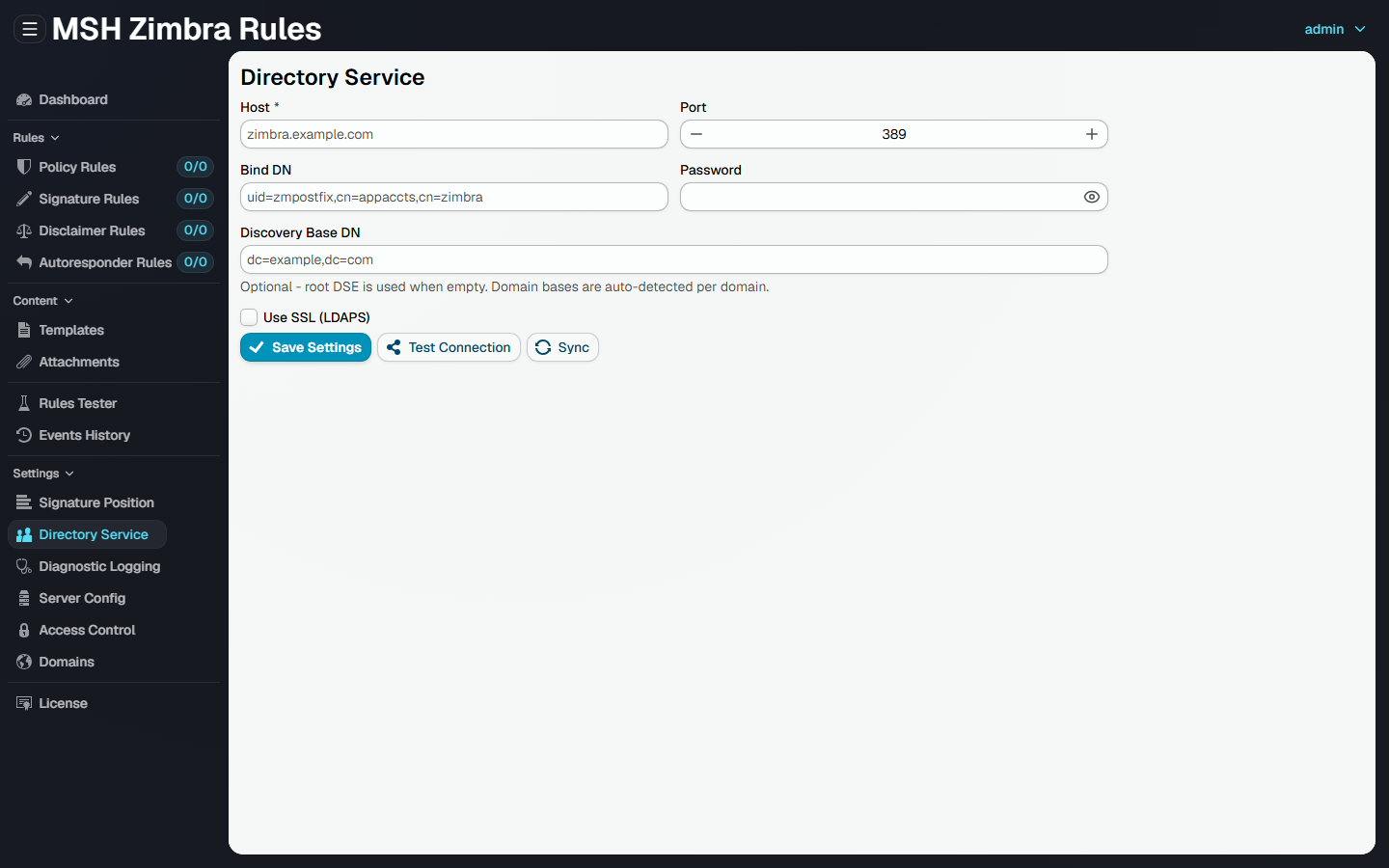
Connection settings
Bind with Zimbra's own LDAP account uid=zimbra,cn=admins,cn=zimbra - the recommended account for this sync. It can filter accounts by zimbraAccountStatus and read the photo attribute for the {photo} template variable; a restricted, read-only application account cannot read either.
Recommended configuration (example for the mail domain ubuntu.lan on the Zimbra host mx.ubuntu.lan):
| Field | Value |
|---|---|
| Host | mx.ubuntu.lan |
| Port | 389 |
| Bind DN | uid=zimbra,cn=admins,cn=zimbra |
| Password | on the Zimbra host: zmlocalconfig -s -m nokey zimbra_ldap_password |
| Discovery Base DN | leave empty, or dc=ubuntu,dc=lan |
| Use SSL (LDAPS) | enable only if your LDAP server requires it (switches the port to 636) |
Discovery Base DN is optional. When it is empty, the sync starts from the LDAP root DSE and discovers all mail domains automatically; the base DN of each domain is auto-detected. Set it only when you want to restrict the sync to a single subtree - a mail domain example.com maps to the base DN dc=example,dc=com (each dot becomes a dc= part).
All zmlocalconfig and zmprov commands run on the Zimbra server as the zimbra user (sudo su - zimbra).
Buttons
- Save Settings - store the connection settings.
- Test Connection - verify the settings connect and bind successfully before saving.
- Sync - save the settings and run a synchronization. The result shows how many domains, users and groups were synced.
Automatic sync
In addition to the Sync button, the directory sync also runs on its own twice a day, at 00:00 and 12:00 server local time, so the cached domains, users and groups do not go stale between manual runs. A scheduled run is skipped while no host is configured. If the directory server cannot be reached when a run is due, the attempt is logged and not retried - the next attempt is simply the next scheduled time.
Verifying the connection manually
List the mail domains known to Zimbra (each domain example.com maps to base DN dc=example,dc=com):
zmprov gad
Verify the bind and the base DN return accounts. Run it remotely from another host if you also want to prove that port 389 is reachable through the firewall:
ldapsearch -x -H ldap://mx.ubuntu.lan:389 -D "uid=zimbra,cn=admins,cn=zimbra" \
  -w "<zimbra_ldap_password>" -b "dc=ubuntu,dc=lan" \
  "(&(objectClass=zimbraAccount)(|(zimbraAccountStatus=active)(zimbraAccountStatus=locked))(!(zimbraIsSystemAccount=TRUE))(!(zimbraIsSystemResource=TRUE))(!(objectClass=zimbraCalendarResource)))" \
  mail displayName zimbraAccountStatus
Notes
- The user sync includes accounts with status
activeorlocked- a locked account still receives mail, only its owner cannot log in. Accounts with statusclosed,maintenance,pendingorlockoutare left out. - Zimbra's system accounts (
admin@,galsync@,spam.*,ham.*,virus-quarantine.*) are excluded, since they carryzimbraIsSystemAccountorzimbraIsSystemResource. - Calendar resources (rooms, equipment) are excluded as well - they are
zimbraCalendarResourceobjects, not user mailboxes.
Additional resources
- Domains - browse the synced domains, users and groups
- Troubleshooting: Directory service - how to diagnose missing users, groups or attributes